
Caching plugins are the fastest way to speed up a WordPress site and lift your Google score. A slow website frustrates visitors and quietly pushes your pages down in the search results. The right caching plugins fix this by serving ready-made copies of your pages in an instant. They cut load times, reduce server strain, and boost your Core Web Vitals. For any site owner chasing speed and rankings, this one change delivers outsized results.
Speed matters because Google now treats page experience as a ranking factor. A site that loads in one second keeps far more visitors than one that takes five. Moreover, faster pages earn higher PageSpeed scores, which support better rankings. Caching is the single most effective lever most owners can pull. The challenge is that dozens of plugins compete for your attention, each promising the world. Choosing the wrong one can complicate your site without delivering real gains.
This article reviews five reliable caching plugins and shows how to pick the right one. You will see how caching works, why it lifts your Google score, and what each plugin does best. Furthermore, it covers our selection criteria and simple setup tips for the biggest speed gains. Each plugin was judged on real performance, features, ease of use, and value. By the end, you will know exactly which option fits your site and your skill level.

1. What Caching Plugins Are and Why They Matter
Caching plugins store ready-made versions of your web pages so they load almost instantly. Without caching, your server rebuilds each page from scratch on every single visit. That process queries the database, runs code, and assembles the page every time. Caching skips most of this work by serving a saved copy instead. As a result, pages appear faster, and your server handles far more traffic. Understanding this simple idea explains why caching is so powerful for speed.
1.1 How Caching Plugins Work
When a visitor first opens a page, the server builds it, and the caching plugin saves a copy. The next visitor then receives that stored copy instead of a freshly built page. This swap removes the heavy database and code work from most requests. As a result, the page loads in a fraction of the original time. The plugin refreshes the cache whenever you update your content. Therefore, visitors always see current pages while still enjoying the speed boost.
Modern caching plugins do far more than store simple page copies. They also minify code, combine files, and load images only when needed. Many add browser caching, which keeps files on a visitor’s device for return trips. Some connect to a content delivery network to serve files from nearby servers. Together, these features attack every common cause of a slow page. In turn, your site feels snappy even on modest hosting plans.
1.2 Caching Plugins and Your Google Score
Google rewards fast sites, so caching plugins directly support better rankings. The search engine measures real loading speed through its Core Web Vitals. A faster page improves these scores, which can lift your position in results. You can check your own numbers with Google PageSpeed Insights in seconds. As a result, the gains from caching are easy to see and measure. Better scores also signal a better experience to every visitor.
Speed affects more than rankings, since it shapes how people use your site. Visitors abandon slow pages, which raises your bounce rate and lowers sales. A quick site, by contrast, keeps people browsing and buying with less friction. This matters as much for a blog as for an online store, as our Shopify growth tips also stress. Therefore, caching improves both your search position and your real results. The score is a useful guide, but the business impact is the true prize.
2. How We Chose the Best Caching Plugins
With so many options available, clear criteria separate the great caching plugins from the rest. We focused on the factors that decide real-world results, not marketing buzzwords. Actual speed gains came first, since that is the entire point of caching. We also weighed features, ease of use, compatibility, and honest value. Each plugin below was tested against the same standards for a fair comparison. The subsections explain exactly what we measured and why it matters for your site.
2.1 Speed Gains and Features
Speed is the reason caching exists, so measurable gains topped our list. We looked at how much each plugin improved load time and PageSpeed scores. The best options cut load times dramatically on real, content-heavy sites. We also checked which performance features each plugin included by default. For example, minification, lazy loading, and database cleanup all add up. As a result, the picks below tackle many speed problems from a single dashboard.
Features matter because a richer toolkit means fewer extra plugins to install. Some caching plugins bundle image optimization, CDN support, and font handling together. Others focus purely on caching and leave the rest to you. We favored tools that balance power with a sensible set of defaults. Meanwhile, too many options can overwhelm a beginner and harm a site. Therefore, we valued plugins that deliver strong results without demanding expert tuning.
2.2 Ease of Use and Compatibility
A powerful plugin is useless if its settings confuse you into mistakes. We rated how easy each tool is to install and configure safely. The best options work well right after activation with little setup. Meanwhile, clear menus and helpful presets protect beginners from breaking their site. As a result, the picks below suit both newcomers and advanced users. Good defaults mean you gain speed without studying technical guides for hours.
Compatibility decides whether a plugin helps or causes hidden conflicts. We checked how each one behaves with popular themes, builders, and stores. A good caching plugin should play nicely with WooCommerce and page builders. Your hosting matters too, since some hosts include their own caching layer, much like the optimized stack at Hostinger. Therefore, we favored tools that coexist smoothly with common setups. Avoiding conflicts keeps your speed gains stable over the long run.
3. The Best Caching Plugins Compared
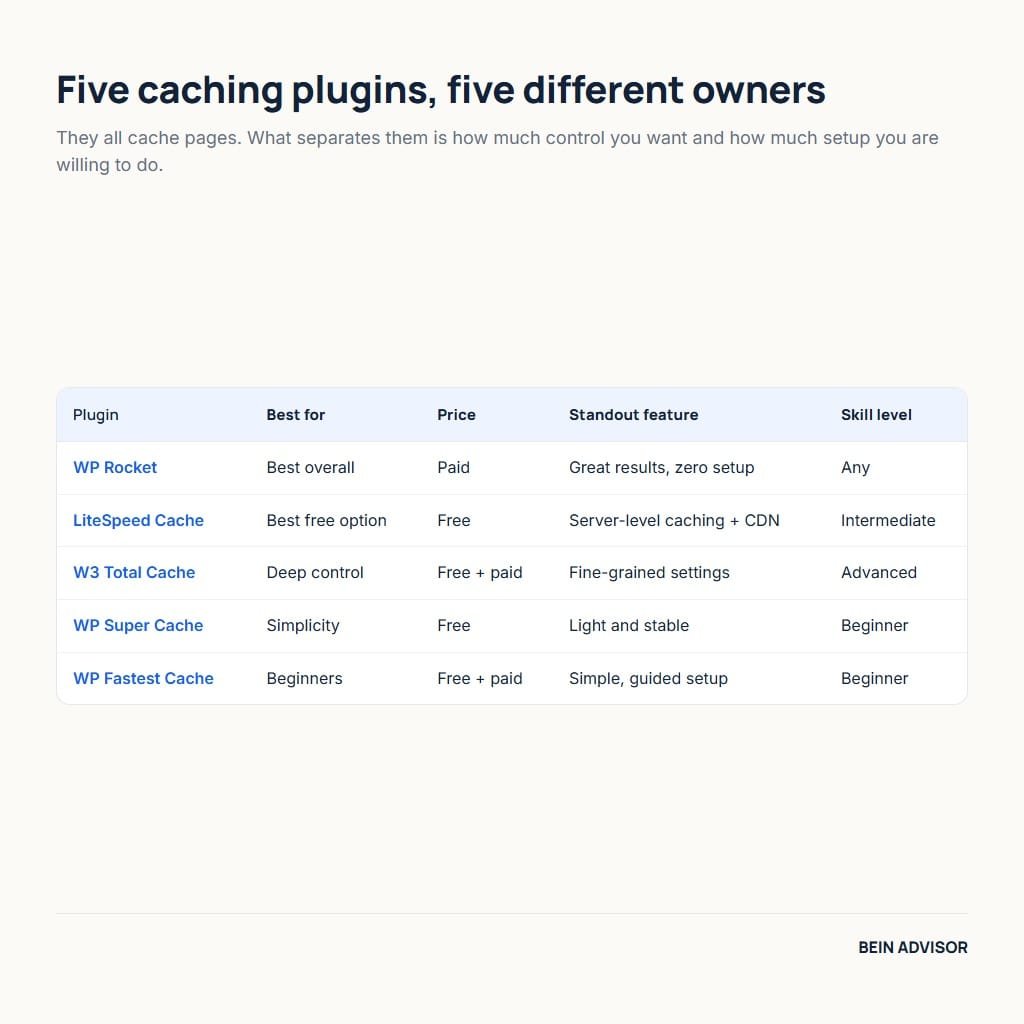
Dozens of caching plugins exist, yet a few stand out for real results and reliability. The five below each suit a particular type of site and skill level. We grouped them by their strongest quality, from premium power to free flexibility. Each entry covers what the plugin does, how it performs, and who should use it. Features and pricing change over time, so confirm the current details before installing. With that noted, here are our top picks and what makes each one worth your attention.
3.1 WP Rocket — Best Overall
WP Rocket is widely seen as the best premium caching plugin for WordPress. It is a paid tool, yet its simplicity and results justify the price for many. The plugin starts improving speed the moment you activate it, with no complex setup. This ease has made it a favorite among beginners and professionals alike.
Under the hood, WP Rocket bundles nearly every speed feature you need. It handles page caching, minification, lazy loading, and database cleanup automatically. Meanwhile, smart defaults apply the best settings without manual tuning. It also integrates with popular CDNs and hosting environments smoothly. As a result, you gain great PageSpeed improvements with very little effort.
WP Rocket suits owners who value time and want results without fuss. Busy bloggers, agencies, and store owners gain the most from its hands-off design. The main trade-off is the yearly subscription, since there is no free version. For anyone who can budget for it, though, it remains the easiest path to speed.
3.2 LiteSpeed Cache — Best Free Option
LiteSpeed Cache is a powerful free plugin that rivals many paid tools. It works best on hosts that run LiteSpeed servers, where it is exceptionally fast. Even on other servers, it still delivers strong caching and optimization features. This generous free offering has earned it a huge, loyal following.
The plugin packs an impressive list of optimization tools at no cost. It offers server-level caching, image compression, and a free CDN option. Meanwhile, it handles minification, lazy loading, and critical CSS generation. The settings are deep, which gives advanced users plenty of control. As a result, a well-configured LiteSpeed install can match premium competitors.
LiteSpeed Cache is ideal for owners who want top performance for free. It shines brightest for sites hosted on LiteSpeed-powered servers. The trade-off is that its many options can overwhelm a complete beginner. For the budget-conscious willing to learn, however, the value is unbeatable.
3.3 W3 Total Cache — Best for Control
W3 Total Cache is a veteran plugin built for users who want deep control. It exposes nearly every caching setting for fine-grained tuning. This flexibility makes it a long-time favorite among developers and advanced owners. A free version covers the essentials, with a paid tier adding more.
The plugin supports many caching methods and storage options at once. It can cache pages, database queries, and objects through several engines. Meanwhile, it offers detailed CDN integration and minification controls. The sheer number of settings is its greatest strength and its biggest risk. As a result, a careful expert can squeeze out excellent performance.
W3 Total Cache best suits technical users who enjoy tweaking every detail. Developers managing complex sites will appreciate its depth and flexibility. The trade-off is a steep learning curve that can intimidate beginners. For those comfortable with the controls, though, it offers near-limitless tuning.
3.4 WP Super Cache — Best for Simplicity
WP Super Cache is a free, trusted plugin from the team behind WordPress.com. It focuses on doing one job well: generating fast static cache files. Its long history and large user base make it a dependable, stable choice. The plugin is light, simple, and easy to set up in minutes.
The tool serves cached HTML files to most visitors for quick page loads. A recommended “expert” mode delivers the fastest results for capable users. Meanwhile, a simpler mode lets beginners enable caching with one click. It lacks the extra optimization features of premium rivals, by design. As a result, it stays light and rarely conflicts with other plugins.
WP Super Cache suits owners who want reliable caching without complexity. Simple blogs and small sites benefit most from its lightweight design. The trade-off is that it handles only caching, not full optimization. For a clean, no-nonsense speed boost, however, it remains a solid pick.
3.5 WP Fastest Cache — Best for Beginners
WP Fastest Cache lives up to its name with a friendly, beginner-first design. The free version sets up in minutes through a clear, simple interface. A modestly priced premium tier unlocks more advanced optimization tools. This gentle approach makes speed accessible to non-technical owners.
The plugin covers the core speed features without overwhelming you. It handles page caching, minification, and browser caching with simple toggles. Meanwhile, the premium version adds image optimization and lazy loading. The tidy checkbox layout makes safe configuration genuinely easy. As a result, beginners gain real speed without fear of breaking things.
WP Fastest Cache is the clearest choice for first-time plugin users. New bloggers and small businesses will love its simple, guided setup. The trade-off is that power users may find it less flexible than rivals. For an easy start with room to grow, though, it fits beginners perfectly.
4. How to Choose and Use Caching Plugins
With several strong options, the best caching plugin is the one that matches your site and skills. Your ideal choice depends on your budget, your hosting, and your comfort with settings. A beginner needs different software than a developer tuning a complex store. Price, features, and compatibility all weigh into the final decision. Rather than chasing the longest feature list, match the tool to your situation. The subsections below help you choose wisely and squeeze out the best speed.

4.1 Match the Plugin to Your Site
Start by judging your budget and your technical comfort honestly. If you want results with zero fuss and can pay, WP Rocket fits best. If you prefer free power and can learn, LiteSpeed Cache is excellent. Beginners who want simplicity should lean toward WP Fastest Cache. Meanwhile, developers who love control will enjoy W3 Total Cache. Matching the plugin to your skill level prevents both frustration and broken pages.
Your hosting environment should also guide the final decision. Sites on LiteSpeed servers gain the most from the LiteSpeed Cache plugin. Some hosts already include their own caching, so check before stacking another layer. Additionally, confirm the plugin works with your theme, builder, and store. Running two caching plugins at once usually causes conflicts and errors. Therefore, pick one tool, test it, and let it handle the job alone.
4.2 Getting the Best Results from Caching Plugins
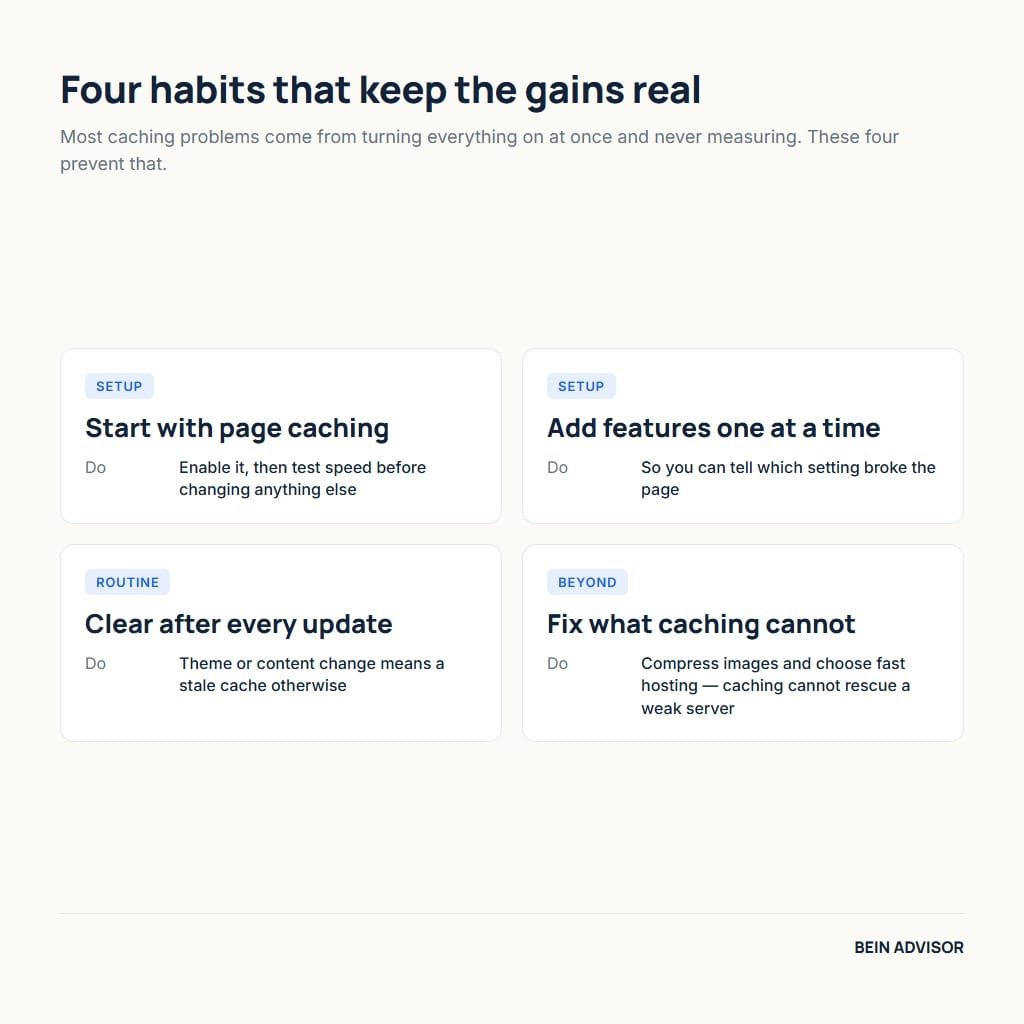
A few smart habits help any caching plugin deliver its best performance. Start by enabling page caching, then test your site speed before changing more. Add optimization features one at a time so you can spot any problems. Always clear the cache after you update your theme or content. As a result, visitors see your latest pages at full speed. Measuring before and after each change keeps your tuning safe and effective.
Caching works best alongside other basic speed habits. Compress your images, since heavy photos slow even a well-cached page. Choose fast, quality hosting, because caching cannot fully fix a weak server. Test your scores regularly with PageSpeed Insights to track your progress. For online stores, these gains compound with the growth tactics in our Shopify secrets article. With caching and these habits combined, your site stays fast and competitive.
| Plugin | Best For | Price | Standout Feature | Skill Level |
|---|---|---|---|---|
| WP Rocket | Best overall | Paid | Great results, zero setup | Any |
| LiteSpeed Cache | Best free option | Free | Server-level caching + CDN | Intermediate |
| W3 Total Cache | Deep control | Free + paid | Fine-grained settings | Advanced |
| WP Super Cache | Simplicity | Free | Light and stable | Beginner |
| WP Fastest Cache | Beginners | Free + paid | Simple, guided setup | Beginner |
| Your Situation | Recommended Plugin |
|---|---|
| Want top results with no effort | WP Rocket |
| Want free power on LiteSpeed hosting | LiteSpeed Cache |
| A developer who loves control | W3 Total Cache |
| Simple blog, minimal fuss | WP Super Cache |
| Complete beginner | WP Fastest Cache |
Conclusion: Caching Plugins — Faster Pages, Better Rankings
Caching plugins remain the simplest way to make a WordPress site dramatically faster. The five picks in this article cover premium ease, free power, deep control, and beginner simplicity. Each one cuts load times and lifts your Google PageSpeed score with little effort. The best choice is simply the one that matches your budget, hosting, and skills. Install a single plugin, test your speed, and measure the gain for yourself. That quick experiment proves how much faster your pages can truly become.
Whichever you choose, a good caching plugin pays off in speed, rankings, and happier visitors. Pair it with optimized images and solid hosting for the strongest results. Clear the cache after updates, and recheck your scores from time to time. Faster pages keep readers engaged and push your site up the search results. The effort is small, yet the payoff touches every visitor you receive. Pick one of these caching plugins today and give your site the speed it deserves.