
Notion AI brings a smart writing and planning assistant directly into the popular Notion workspace. For anyone drowning in scattered notes and to-do lists, Notion AI promises to bring order to the chaos. It writes, summarizes, and organizes your work without forcing you to switch apps. The result is a single, intelligent home for your tasks, projects, and ideas. This review explains what it does well and where it falls short.
This review matters because productivity tools are only useful if they truly save time. Many AI add-ons sound impressive yet add friction to your day. Notion AI takes a different path by living inside a workspace you may already use. It turns rough notes into clear plans and answers questions about your own documents. As a result, the line between writing and organizing almost disappears. The real question is whether that convenience justifies the price.
This article reviews Notion AI through six powerful secrets for organizing your daily tasks. You will see how it works, which features matter most, and how it structures your day. Furthermore, it covers pricing, honest pros and cons, and who benefits most. Each judgment is based on real workflow use, not marketing claims. By the end, you will know whether Notion AI deserves a place in your routine.
1. What Is Notion AI and Why It Matters
Notion AI is an artificial-intelligence assistant built into Notion, an all-in-one workspace app. It lives beside your notes, databases, and documents rather than in a separate tool. With a quick command, it drafts text, summarizes long pages, and pulls answers from your content. This tight integration is what sets it apart from standalone chatbots. Understanding this design helps you see why it fits naturally into daily work. Once you grasp how it blends into the workspace, its real value becomes clear.
1.1 How Notion AI Works
Notion AI works through simple commands inside any Notion page. You highlight text or type a prompt, then ask it to write, edit, or summarize. The assistant draws on a large language model to generate a response in seconds. Because it sits inside your workspace, it can also read your existing pages. As a result, it answers questions using your own notes and documents. This context makes its replies far more relevant than a generic chatbot’s.
The feature set reaches across writing, planning, and knowledge search. You can ask it to brainstorm ideas, fix grammar, or change the tone of a draft. Meanwhile, its Q&A feature searches your entire workspace to answer a question. According to the official Notion AI page, it connects notes, tasks, and documents in one place. For example, it can summarize a meeting note and create action items instantly. Therefore, one tool handles jobs that once needed several apps.
1.2 Who Should Use Notion AI
Notion AI suits anyone who already organizes work or study inside Notion. Students use it to summarize readings and plan assignments quickly. Meanwhile, freelancers and small teams rely on it to draft proposals and track projects. Writers value how it overcomes a blank page with a quick first draft. Because it lives in the workspace, it fits naturally into existing habits. For current Notion users, it feels less like a new app and more like a superpower.
That said, the tool is less compelling for people who do not use Notion. Adopting it means committing to the wider Notion ecosystem first. Someone happy with a simple notes app may find the move unnecessary. However, for those willing to centralize their work, the payoff is significant. The assistant rewards users who keep their notes and tasks in one place. In turn, the more you store in Notion, the smarter its answers become.

2. Notion AI Key Features for Daily Tasks
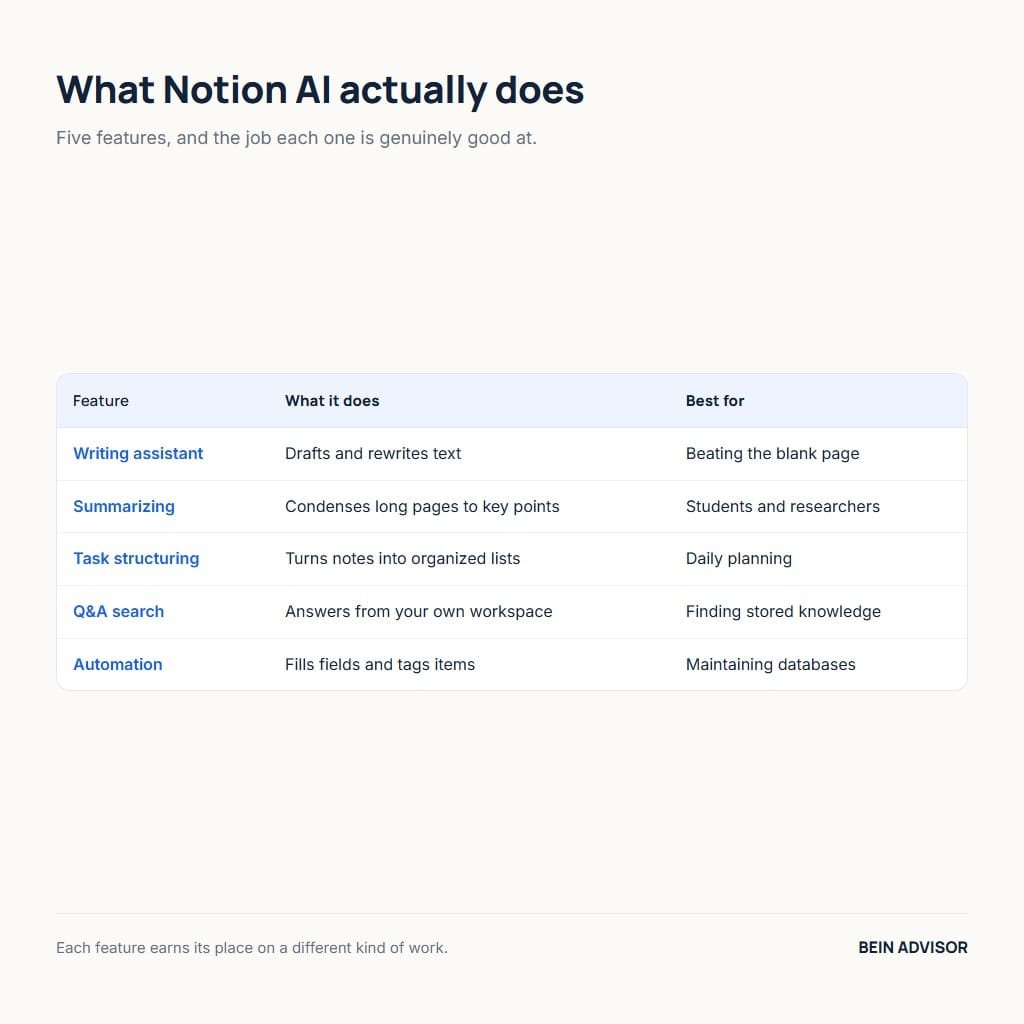
The strength of Notion AI lies in a handful of features that touch daily work directly. It writes and edits text, summarizes long content, and answers questions from your notes. Each feature removes a small friction that otherwise slows your day. Together, they turn a passive notebook into an active assistant. Knowing these tools in detail helps you judge whether they match your needs. The subsections below break down the features that matter most for tasks.
2.1 Writing and Summarizing
Writing assistance is the feature most people notice first. Notion AI drafts emails, outlines, and documents from a short prompt. It also rewrites clumsy sentences and adjusts tone for different audiences. For anyone who stalls at a blank page, this quick start is genuinely useful. As a result, a rough idea becomes a polished paragraph in moments. The time saved on routine writing adds up quickly over a week.
Summarizing is equally valuable for busy students and professionals. The assistant condenses a long page, article, or meeting note into key points. Meanwhile, it can extract action items so nothing important slips away. This turns dense information into a clear, scannable list in seconds. For example, a long research note becomes a tidy summary you can act on. Therefore, you spend less time rereading and more time doing.
2.2 Task Automation and Q&A
Beyond writing, Notion AI helps automate and organize the moving parts of a project. It can fill database fields, tag items, and generate structured lists automatically. This reduces the manual upkeep that makes many systems collapse over time. As a result, your task boards and trackers stay current with less effort. The assistant quietly handles the tedious admin behind a tidy workspace. In turn, your system keeps working even on your busiest days.
The Q&A feature may be the most powerful tool of all. You can ask a plain question and get an answer drawn from your own workspace. For instance, you might ask what was decided in last week’s meeting. Instead of searching manually, you receive a direct reply with sources. This is similar to how an AI transcription tool makes recordings searchable. Consequently, your stored knowledge finally becomes easy to retrieve.
3. How Notion AI Organizes Your Daily Tasks
The real test of any productivity tool is how it handles your daily tasks. Notion AI shines here by turning messy thoughts into structured, actionable plans. It captures ideas, sorts them into projects, and helps you decide what to do first. Because it lives beside your databases, it can build and update task lists directly. This bridges the gap between jotting a note and acting on it. The subsections below show exactly how it organizes a typical day.
3.1 Capturing and Structuring Tasks
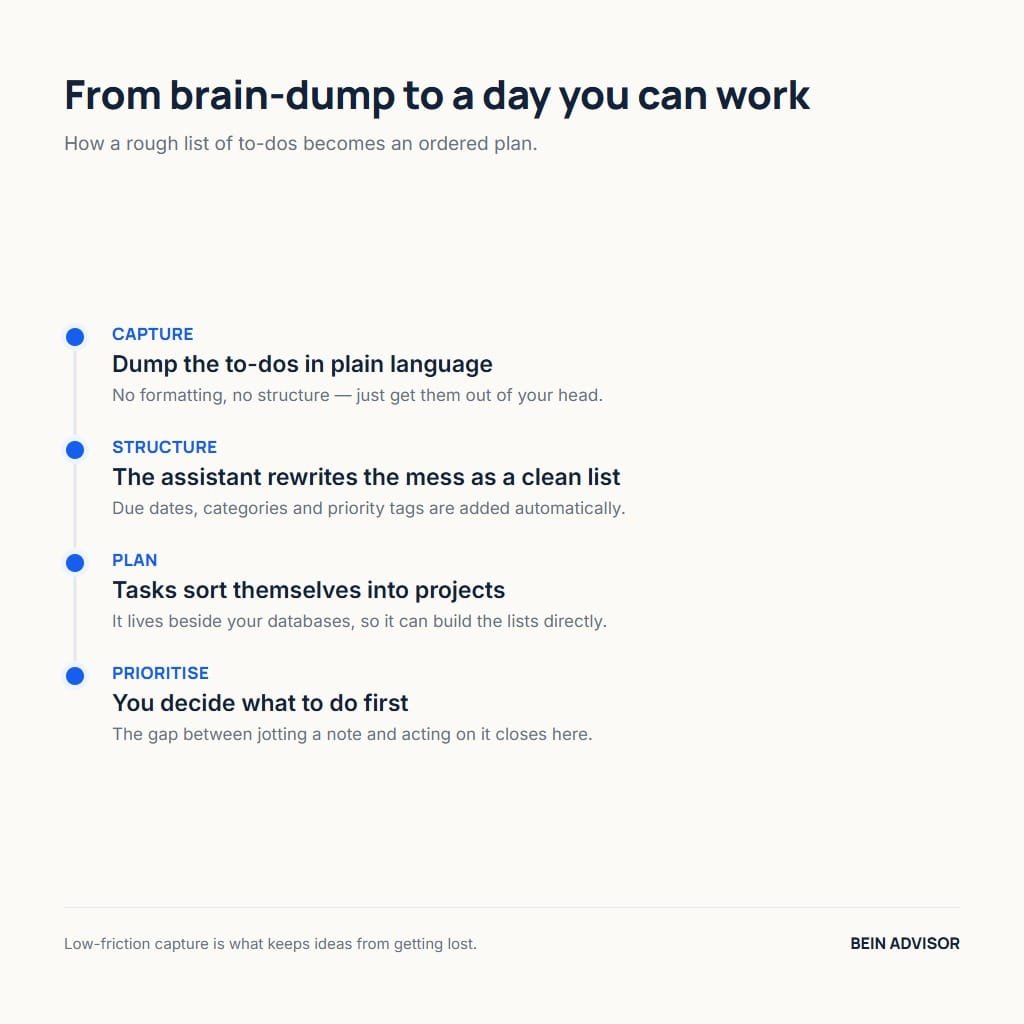
Capturing tasks quickly is the foundation of any reliable system. With Notion AI, you can dump a rough list of to-dos onto a page in plain language. The assistant then turns that messy text into a clean, structured list. It can add due dates, categories, and priority tags automatically. As a result, a chaotic brain-dump becomes an organized task board in seconds. This low-friction capture keeps ideas from getting lost.
Structuring those tasks is where the workspace integration pays off. Notion AI can sort items into projects and link related notes together. Meanwhile, it builds tables and boards that update as your work changes. For example, it can group tasks by client or by deadline on command. This saves the manual setup that usually discourages people from staying organized. In turn, your system stays tidy without constant maintenance.
3.2 Planning and Prioritizing with Notion AI
Once tasks are captured, planning the day becomes much easier. Notion AI can suggest a sensible order based on deadlines and importance. You can ask it to build a daily schedule or a weekly plan from your list. As a result, the overwhelming question of where to start gets a clear answer. The assistant turns a long list into a focused plan you can follow. This gentle guidance reduces the decision fatigue that drains many workers.
Prioritizing well is what separates a busy day from a productive one. The assistant helps you spot which tasks truly move a project forward. Meanwhile, it can flag overdue items and break big goals into smaller steps. For instance, it might split a vague project into clear, doable actions. Building reliable habits this way works much like any system in our guide to building an online course. Consequently, steady progress replaces the stress of a scattered to-do list.

4. Notion AI Pricing and Value
Price is where many people decide whether Notion AI fits their life. The assistant is an add-on that costs extra on top of a regular Notion plan. For light users, that extra fee can feel hard to justify at first. For heavy users, however, the time saved often outweighs the cost. Understanding the pricing structure helps you judge the real value for you. The subsections below break down the plans and whether the spend is worthwhile.
4.1 Plans and Pricing
Notion itself offers a free plan that suits many individuals well. The AI assistant, however, is a paid add-on charged per member each month. You can try a limited number of AI responses before deciding to pay. After that trial, continued use requires the monthly subscription. As a result, casual users can sample the tool before committing any money. This trial period is a fair way to test the value firsthand.
For teams, the cost multiplies across every member who needs access. Pricing changes over time, so always confirm the current rate before buying. Meanwhile, the add-on unlocks unlimited use of writing, summarizing, and Q&A. For a team that drafts and plans constantly, that can be a bargain. However, an occasional user may struggle to use enough to justify it. Therefore, your usage level is the key factor in the math.
4.2 Is Notion AI Worth It
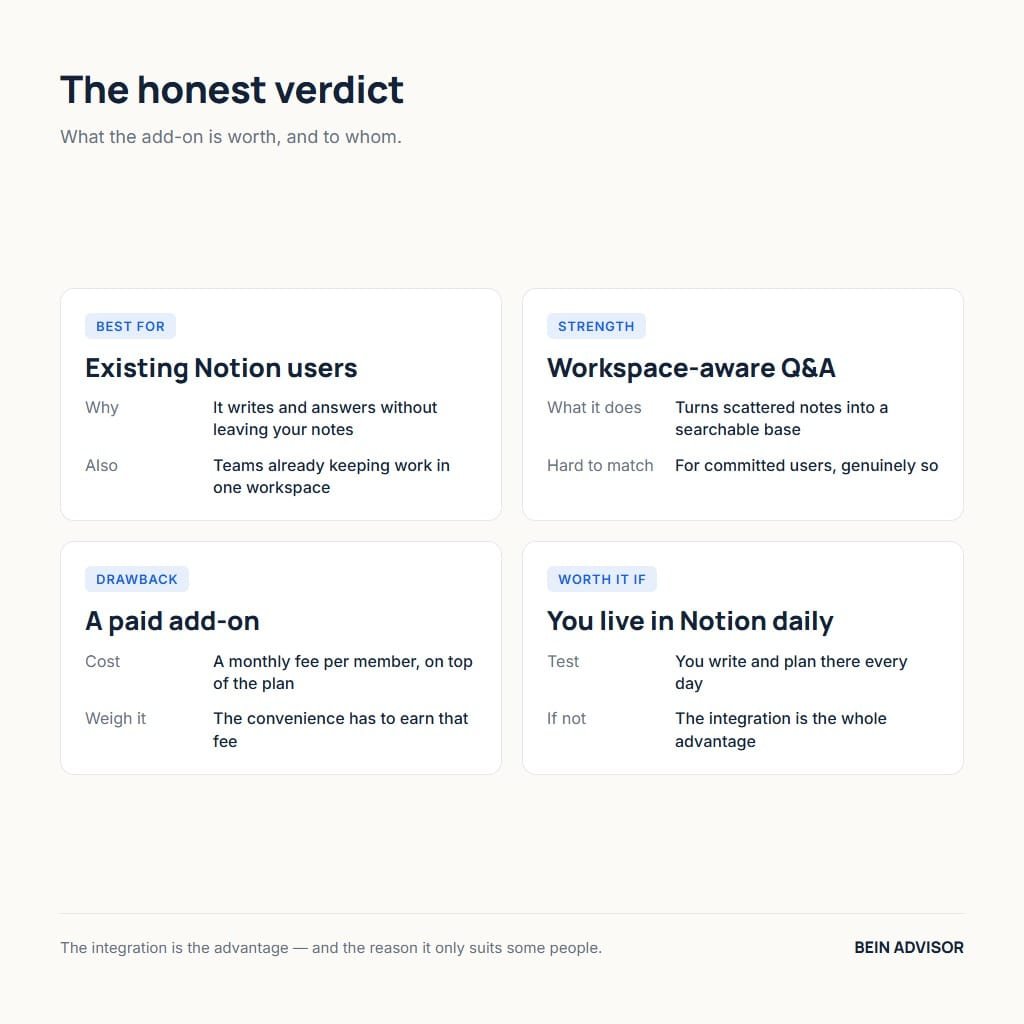
Whether Notion AI is worth it depends mostly on how you work. If you already live in Notion, the assistant adds real daily value. The time saved on writing and organizing can easily cover the fee. As a result, heavy users often find it pays for itself within weeks. For them, the seamless integration is worth more than a cheaper standalone tool. The convenience of one connected workspace is the deciding factor.
For lighter users, the decision is less clear and worth testing carefully. A general chatbot may handle occasional writing for free or less money. However, those tools cannot read and organize your personal workspace. Notion AI’s value grows the more notes and tasks you store inside it. Therefore, the honest answer is that it suits committed Notion users best. Try the free responses first, then judge the value against your own habits.

5. Notion AI Pros, Cons, and Who It Is For
Every tool has strengths and weaknesses, and Notion AI is no exception. A fair review weighs what it does brilliantly against where it falls short. The assistant excels at integrated writing and organizing, yet it carries real limits. Knowing both sides helps you set sensible expectations before you commit. This balance also reveals which kind of user benefits the most. The subsections below lay out the honest pros, cons, and ideal audience.
5.1 Pros and Cons
The biggest advantage is the deep integration with your workspace. Notion AI writes, summarizes, and answers questions without leaving your notes. It saves real time on routine tasks and keeps everything in one place. Additionally, the Q&A feature turns your scattered notes into a searchable knowledge base. For committed Notion users, these strengths are genuinely hard to match. The convenience alone can reshape how you handle daily work.
The drawbacks are real and worth weighing honestly. The add-on cost stacks on top of an existing Notion subscription. Meanwhile, its answers are only as good as the notes you have stored. People who do not already use Notion face a steep setup commitment. For example, the tool offers little to someone outside the ecosystem. Therefore, the value depends heavily on how much you invest in the workspace.
5.2 Who Should Use Notion AI
Notion AI is the clearest win for people already devoted to Notion. Students, writers, freelancers, and small teams gain the most from it. They keep notes and tasks in the app, so the assistant has rich context. As a result, its answers and summaries feel tailored to their actual work. For these users, the tool quickly becomes part of the daily routine. The deeper their workspace, the more powerful the assistant becomes.
People who prefer a simple, separate notes app should think twice. Adopting Notion AI means buying into the larger Notion system first. A casual user might get similar writing help from a free chatbot. However, that free tool cannot organize a personal workspace the same way. Those who enjoy creating AI content may also like our InVideo AI guide. Ultimately, the right fit comes down to whether Notion is your home base.
| Feature | What It Does | Best For |
|---|---|---|
| Writing assistant | Drafts and rewrites text | Beating the blank page |
| Summarizing | Condenses long pages to key points | Students and researchers |
| Task structuring | Turns notes into organized lists | Daily planning |
| Q&A search | Answers from your own workspace | Finding stored knowledge |
| Automation | Fills fields and tags items | Maintaining databases |
| Consideration | The Verdict |
|---|---|
| Best for | Existing Notion users and teams |
| Strongest feature | Workspace-aware Q&A |
| Main drawback | Paid add-on cost |
| Pricing model | Monthly fee per member |
| Worth it if | You write and plan in Notion daily |
Conclusion: Notion AI — A Smart Upgrade for Your Workflow
Notion AI is a genuinely useful upgrade for anyone who lives inside Notion. It writes, summarizes, organizes, and answers questions without ever leaving your workspace. The six secrets in this review show how it turns scattered notes into a clear plan. Its standout strength is reading your own content to deliver tailored, relevant help. The main trade-off is the add-on cost, which suits heavy users far more than light ones. For committed Notion fans, the time it saves easily justifies the price.
If you already organize your life in Notion, this assistant is well worth a trial. Start with the free responses and test it on a real project of your own. Capture your tasks, ask it to plan your week, and judge the results honestly. For the right user, Notion AI transforms a passive notebook into an active partner. The technology keeps improving, so its value will only grow over time. Give it a try today and let it bring order to your daily tasks.