

Ranked lists collapse under one question: best for whom? A plan that suits a first blog fails a store with seasonal spikes, and the reverse is equally true. Best web hosting is therefore a matching problem rather than a leaderboard. This article sorts the options by situation, states the criteria openly, and names the trade-off attached to every pick.
Three situations cover most readers. Some are launching a first site where the entry price genuinely decides whether the project starts. Others publish steadily and need response times that do not wander. A third group runs uneven traffic, where a quiet month is followed by a campaign that multiplies load. Additionally, a fourth group simply wants maintenance handled. Each situation points at a different plan, and the differences are larger than the marketing suggests.
What follows is organised so you can stop reading early. Section one states the selection criteria, so you can disagree with the conclusions on your own terms. Sections two through four cover the situations. Section five compares everything in one table. Finally, section six covers the setup work that protects performance regardless of which plan you pick. Consequently the decision should take minutes rather than an evening.
A note on method: this article names specific providers, and every recommendation follows the criteria set out in section one. Those criteria are applied identically to each option, and any provider that fails them is excluded regardless of how well known it is.
1. How We Chose the Best Web Hosting
Selection criteria decide a list more than the providers do. Publishing them lets you overrule the conclusion when your priorities differ, which is the point of a recommendation rather than an advertisement. Four factors carried the most weight here: total cost across two terms, the resource limits that bind real performance, support scope during incidents, and freedom to migrate away. Furthermore, one factor was weighted deliberately low. Raw benchmark speed varies so much between test conditions that it rarely predicts what a specific site will experience.
1.1 The Criteria Behind Our Best Web Hosting List
Two-year total cost led the assessment, because the advertised rate applies only to a first term. Each provider was scored on the sum of first-term and renewal-term charges, divided across the full period. Resource limits came second: entry processes, memory per process, storage technology, and whether the storage figure includes backups. Additionally, software currency mattered, since a provider that keeps customers on an end-of-life release imposes a silent performance penalty. These figures all sit in published specification tables, which means you can verify every one of them independently.
Support scope and exit freedom completed the set. Support was assessed on whether help extends past the server boundary into site software, because that boundary is where most real incidents occur. Exit freedom was assessed on full file and database access, plus whether the domain can sit with an independent registrar. Consequently a provider that scores well on price but poorly on exit was ranked below one with the reverse profile. In our reading, the cost of being stuck exceeds the cost of paying slightly more, particularly once a site earns revenue.
1.2 What This Assessment Deliberately Ignored
Uptime percentages were excluded, and the reason is practical. Nearly every provider advertises the same figure, and the guarantee usually compensates in service credit rather than in recovered traffic. A claim that does not discriminate between options cannot inform a choice. Similarly, published benchmark scores were treated as weak evidence. Test conditions differ so widely between reviewers that two honest tests can reach opposite conclusions. In contrast, the specification figures used here are stated by the providers themselves and remain checkable months later.
Marketing language around speed was also set aside. Descriptions such as turbo, blazing, or optimised carry no measurable definition, and they appear across providers with very different underlying hardware. What replaced them was the field-metric standard that Google applies to real visits, described in its page experience documentation. That standard measures what readers actually encounter. Therefore it offers a common yardstick, and it is the one worth applying to your own site once a plan is running.

2. Best Web Hosting for a First Site
A first site has one dominant constraint, and it is rarely technical. The project must start before enthusiasm fades or budget is reallocated. Entry price therefore matters more at this stage than at any later one. Nevertheless the entry price must not conceal a renewal that arrives before the site earns anything. The right pick for this situation combines a genuinely low first term with a renewal that stays survivable, plus enough resources to carry a growing blog without an early forced upgrade.
2.1 Hostinger: Where the Low Entry Price Holds
Hostinger occupies the budget end of the market without sitting at the bottom of it. Its position rests on running its own infrastructure and pricing aggressively for the first term. For a new blog, portfolio, or small business site, the entry tier carries enough resources to publish regularly and grow into hundreds of pages. Additionally, the control panel is built in-house rather than licensed, which keeps costs down and makes the interface simpler than traditional panels for someone setting up a first site.
On specifications, the entry plans include NVMe storage, free SSL, and a free domain for the first year. Data centres span several regions, which matters for readers outside North America and Europe. Automated daily backups appear on most tiers, though retention length varies by plan. Furthermore, PHP version switching is available from the panel, so you are not stranded on an old release. The one figure to check before purchase is the renewal rate, since the gap between promotional and standard pricing is wide here.
This option suits readers whose main risk is never starting, and our longer assessment of Hostinger covers the detail. The main trade-off to weigh is that shared resources vary with neighbouring sites, so a traffic spike can produce noticeable slowness. Consequently it fits publishing schedules that are steady rather than viral. For a site that expects sudden campaign traffic within its first year, the cloud option in section four is a better structural match despite the higher price.
2.2 Who Should Look Elsewhere
Budget tiers stop fitting under three conditions, and recognising them early saves a migration. The first is revenue dependence: once downtime costs money directly, reserved resources justify their price. The second is a support-heavy workflow, where you expect help with plugin conflicts rather than server faults alone. Meanwhile the third is regulatory or client pressure requiring guaranteed isolation. None of these applies to most first sites. However, when any of them does apply, starting one tier higher costs less than migrating under pressure six months later.
Term length deserves a deliberate decision here rather than a default. Budget providers offer their deepest discounts on multi-year commitments, which is precisely when you know least about your own traffic. A twelve-month term captures most of the saving while preserving the option to move. Therefore treat the four-year price as information rather than as an offer to accept. In fact, the difference between a one-year and a four-year commitment often shrinks considerably once you account for the flexibility you give up.
3. Best Web Hosting for Consistent Speed
Consistency differs from speed, and the distinction decides this category. A plan can post excellent peak numbers while varying widely through the day. For a publisher whose readers arrive continuously, that variation is worse than a slightly lower average. What matters here is a narrow spread between best and worst response times. Additionally, the platform-level tuning that specialist providers apply tends to help more than raw hardware, because most delay in a content site comes from database work rather than from file transfer.
3.1 SiteGround: Paying for Predictability
SiteGround sits above the budget tier and markets itself on performance engineering rather than price. Its infrastructure runs on Google Cloud, and it layers its own caching and PHP handling on top. For publishers running WordPress specifically, that tuning is the product. The company also maintains a reputation for support that engages with site-level problems rather than stopping at the server boundary. Consequently it appeals to readers who would otherwise spend their own hours diagnosing plugin conflicts and slow queries.
Specifications reflect the positioning rather than competing on headline numbers. Storage allowances are smaller than budget competitors offer, which is a deliberate choice given that most content sites use a fraction of what they are given. In exchange, plans include staging environments, daily backups with self-service restore, and a caching layer maintained by the provider. Moreover, PHP versions are kept current by default. The account limits are expressed in monthly visits rather than vague process caps, which makes capacity planning noticeably easier.
This option suits established publishers who already know their traffic and want it served consistently. The trade-off is straightforward and worth stating plainly: the renewal price is substantially higher than budget alternatives, and the storage ceiling is genuinely lower. Therefore it is poor value for a site that has not yet found readers. In contrast, for a site earning revenue from consistent traffic, the premium buys fewer performance investigations and less unpaid maintenance work, which usually costs more than the price difference.
3.2 The Trade-off You Accept
Performance-oriented plans concentrate their value in software rather than in allowances. That concentration is efficient when you use the platform they optimise for, and wasteful when you do not. A site running something other than WordPress captures little of the tuning while paying the full premium. Similarly, a media-heavy site can hit the storage ceiling long before it hits the visit limit. Consequently the fit question is narrow: are you running the optimised platform, and is your content light enough to stay inside the allowance?
Visit-based limits carry their own consideration that is easy to overlook. Counting is usually performed on unique visits within a period, and bot traffic can consume part of the allowance. A site attracting heavy crawler activity may therefore approach its ceiling faster than its analytics suggest. Furthermore, exceeding the limit typically triggers an upgrade prompt rather than an outage, so the cost appears as a bill rather than as downtime. Checking how your provider counts is a five-minute task that prevents an unwelcome surprise.
4. Best Web Hosting for Uneven Traffic
Uneven traffic breaks the assumptions behind fixed plans. A site that sits quiet for weeks and then absorbs a campaign needs capacity it does not pay for continuously. Fixed tiers force a choice between paying for the peak all year or failing during the peak. Cloud plans resolve that by scaling with demand and billing accordingly. However, the flexibility introduces a different management burden, since the bill now varies with events you do not fully control.
4.1 Cloudways: Managed Cloud Without a Sysadmin
Cloudways occupies an unusual position: it manages servers that you rent from underlying cloud providers. You choose the infrastructure, and the platform handles provisioning, updates, and monitoring. That structure separates the two things beginners usually cannot separate, namely raw cloud capacity and the expertise to run it. Consequently a small team gains cloud behaviour without hiring anyone to administer Linux, which is the barrier that keeps most publishers on shared plans longer than they should be.
On specifications, you select provider, region, and server size, then scale vertically when demand requires it. Included tooling covers staging, automated backups, server-level caching, and free migration for a first site. Billing is monthly and usage-based rather than prepaid for years. Additionally, because you are not locked into a long term, the switching cost stays low throughout. The platform sits on top of standard infrastructure, so a later move away is technically ordinary rather than a rebuild.
This option suits projects with campaign-driven or seasonal traffic and some technical confidence. The main trade-off is that the entry price sits well above shared plans, and the bill moves with usage rather than staying fixed. Therefore budgeting requires attention that a flat plan does not demand. For a first blog with no revenue, that combination is difficult to justify. In contrast, for a store or a publisher with known spikes, paying for capacity only when it is used is usually cheaper than provisioning for the worst month permanently.
4.2 When the Variable Bill Bites
Usage-based billing rewards attention and punishes neglect. Bandwidth overages, forgotten staging servers, and add-on services accumulate quietly between invoices. A server spun up for a test and left running costs the same as a production one. Consequently the discipline required is administrative rather than technical: review the account monthly and remove what is idle. Furthermore, set a billing alert at a threshold you would want to know about. That single setting converts a surprise into a notification.
Sizing deserves equal care, because the temptation runs toward over-provisioning. Starting on a modest server and scaling upward when metrics justify it costs less than reserving headroom you may never use. Cloud plans make vertical scaling quick, which is precisely why beginning small is safe here. Similarly, resist adding managed extras at signup before you know whether you need them. Each is easy to enable later. In fact, the ability to add capacity in minutes is the entire reason to accept a variable bill.

5. Comparing the Best Web Hosting Options
A comparison table earns its place only when it compares decisions rather than features. The table below therefore sets the three picks against the factors from section one, plus the two situations that most often force a change of plan. Read it after you have identified your own situation, not before. Otherwise the columns invite the exact mistake this article is written to prevent, which is choosing the option that looks strongest overall rather than the one that fits.
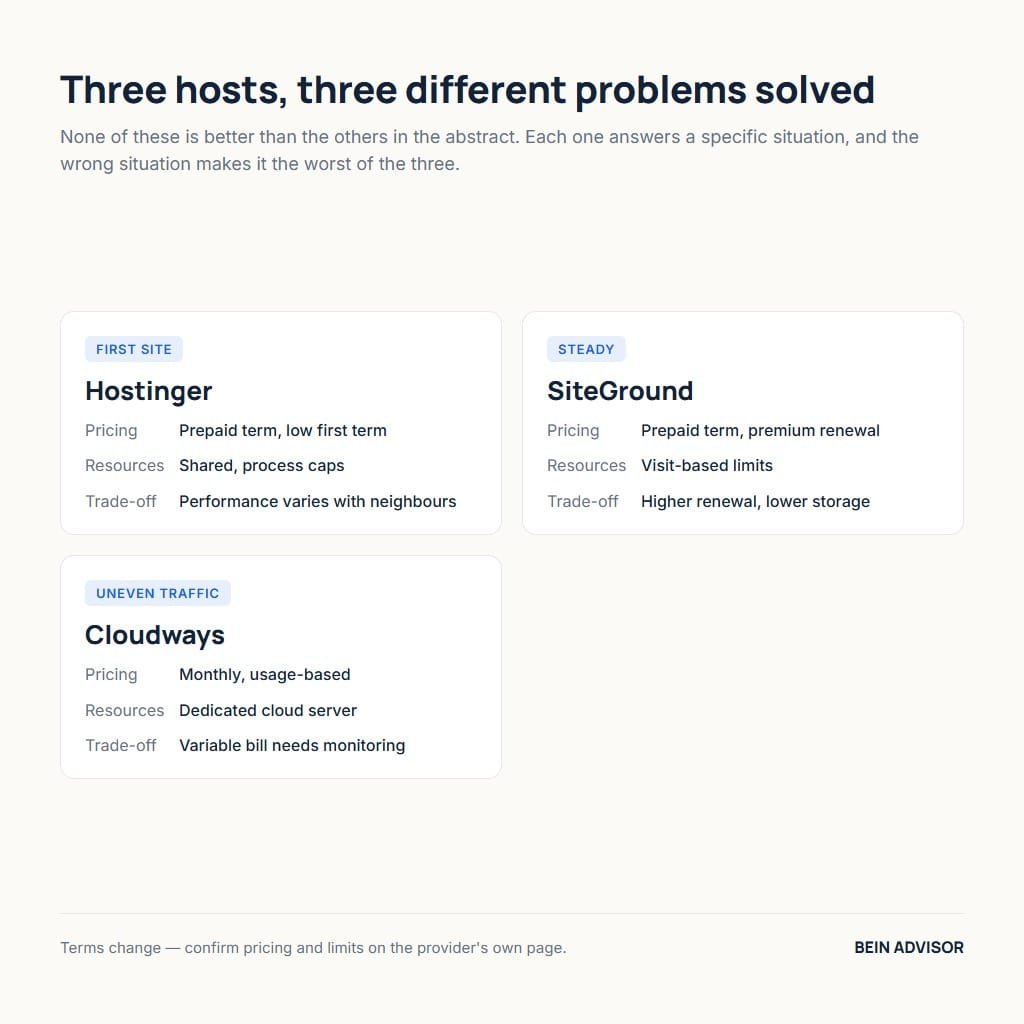
| Factor | Hostinger | SiteGround | Cloudways |
|---|---|---|---|
| Best suited to | First sites, tight entry budget | Steady publishers on WordPress | Campaign or seasonal traffic |
| Pricing model | Prepaid term, low first term | Prepaid term, premium renewal | Monthly, usage-based |
| Resource style | Shared, process caps | Visit-based limits | Dedicated cloud server |
| Support scope | Mostly server level | Extends into site software | Platform and server level |
| Exit friction | Low, standard stack | Low, standard stack | Low, ordinary cloud below |
| Main trade-off | Performance varies with neighbours | Higher renewal, lower storage | Variable bill needs monitoring |
5.1 Reading the Best Web Hosting Comparison
Start from the row that describes your constraint rather than scanning the columns. When entry budget is the binding limit, the first row settles the question immediately. When the concern is response times that wander, the resource-style row matters most, because visit-based limits behave differently from process caps. Additionally, the exit-friction row deserves a glance even though all three score similarly. Its purpose is to confirm that none of these choices is difficult to reverse, which lowers the stakes of the decision considerably.
Notice what the table does not contain, since the omissions are deliberate. There is no overall score, because a single number would hide the situational fit that the whole article argues for. There are no specific prices, because promotional rates change frequently and a stale figure is worse than none. Instead the pricing row describes the model, which changes rarely. Therefore you should read the model here and collect the current numbers from the provider’s own page at the moment you buy.
5.2 Two Situations the Table Cannot Settle
Two circumstances override every row above. The first is an existing relationship that already works. Migrating a functioning site to save a small monthly amount rarely repays the risk and the hours involved. Consequently the honest recommendation for a satisfied customer is usually to stay. The second is a technical requirement specific to your stack, such as a particular database version or an extension your application needs. When such a requirement exists, it filters the market before any of these criteria apply.
Geography forms a third consideration that sits outside the table entirely. A provider that scores well on every factor still disappoints when its nearest data centre sits a continent away from your readers. Therefore check region availability before applying anything else in this article. For an audience concentrated in the Gulf or North Africa, a European region typically performs better than a North American one. In fact, region choice frequently matters more to measured load time than the difference between two providers in the same tier.
6. How to Get the Best Results From Your Plan
The plan you choose sets a ceiling, and configuration decides how much of that ceiling you reach. Most sites operate well below what their existing plan permits, which is why upgrades so often disappoint. A short setup routine and a few ongoing habits recover more performance than moving one tier upward. Furthermore, these steps apply identically across all three picks above, so none of the effort is wasted if you later change provider.
6.1 The First Week Checklist
Five actions in the first week prevent most later problems. Region: confirm the data centre matches your audience before publishing anything, since changing it later means migrating. PHP version: switch to the current release from the control panel rather than accepting the default. Backups: verify retention length and perform one test restore so you know the process works. Caching: enable the provider’s server-level cache before adding any plugin that duplicates it. Domain: confirm it is registered somewhere you control independently.
The test restore deserves emphasis because almost nobody performs it. A backup that has never been restored is an assumption rather than a safeguard. Running one restore into a staging environment confirms three things at once: that the archive is complete, that you have the permissions required, and that you know the steps under no pressure. Consequently the exercise costs twenty minutes and removes the worst category of surprise. Repeat it after any major platform change, since restore procedures occasionally shift between provider updates.
6.2 Habits That Protect Speed Over Time
Performance degrades gradually through accumulation rather than suddenly through failure. Plugins added for one experiment stay installed. Images uploaded at full camera resolution remain unoptimised. Database tables fill with revisions and expired transients. Each addition is individually trivial, and together they explain most complaints that arrive years after a site launched. Therefore a quarterly review that removes unused plugins and compresses new images preserves more speed than any plan upgrade. Our overview of caching options covers the configuration side in detail.
Measurement should anchor these habits so effort follows evidence. Track the field metrics monthly and note which direction they move. When the numbers hold steady while your content grows, the plan is coping and no upgrade is warranted. When they drift downward across several months despite housekeeping, the constraint has genuinely moved to the server. Consequently the upgrade decision becomes evidence-led rather than anxious. That sequence, measure first and upgrade second, is what separates money well spent from money spent on reassurance.
Conclusion: Best Web Hosting Is a Fit, Not a Rank
Three situations, three answers. A first site with a tight entry budget is served well by the budget tier, provided the renewal rate is read before purchase. A steady publisher on WordPress gains more from consistency than from allowances, which justifies the performance premium. Meanwhile a project with campaign-driven traffic benefits from paying for capacity only when it is used. Best web hosting means the option matching your row, and nothing in this article recommends the same plan to all three.
Take one step before you buy. Identify which of the three situations describes you today rather than the one you hope to reach, then open that provider’s pricing page and record the renewal rate alongside the entry price. If the two-year total still works, the decision is made. Afterwards, spend the first week on the checklist above rather than on further comparison. The configuration work returns more than any remaining difference between these options.
Practical Books for Comparing Web Hosting
As an Amazon Associate, BeIN ADVISOR earns from qualifying purchases.
These books are optional background reading. They do not replace current provider terms, renewal pricing, resource limits, backup rules, migration details, or a measured test on your own site. Check the live listing and price before buying.
Web Hosting For Dummies: The listing presents a beginner-friendly guide to hosting, domains, control panels, and provider comparisons. It can clarify the vocabulary behind a shortlist, but verify every current specification with the provider you choose.

Modern Web Development: The listing describes a beginner guide covering HTML, CSS, hosting, and SEO. It fits readers who are building a site alongside choosing hosting, but it cannot guarantee speed, indexing, or business results.

WordPress Web Hosting: The listing focuses on WordPress hosting and cPanel control. It may help a beginner understand setup and panel tasks; compare its examples with the provider’s current interface before applying them.

Use the books as study aids, then make the final choice from current cost, resource needs, backups, support, measured performance, and a clear exit path.