

A Skillshare membership earns its cost in one way: you finish class projects and keep them. Every class in the library includes a project, and the Project Gallery gives you a place to post it for feedback. In contrast, what drains the money is a month that passes with nothing made. This review weighs the membership by that standard, using only what Skillshare itself publishes.

The standard comes from course design. A course designer judges a class by what the learner can produce at the end. The questions below therefore ask what you will make, how soon you can tell whether a Skillshare membership suits you, and what a wrong guess costs. The plan choice, the refund rules and the certificate all follow from those three questions; a final section then turns to the other side of a class: teaching one.
Who Gets Value From a Skillshare Membership, and Who Should Skip It
Start with who benefits. A Skillshare membership suits a self-taught creative who learns by making things. The library covers illustration, graphic design, photography and writing, among other subjects. Because each class ends with a project, a freelancer in those fields leaves each finished class with a piece of work that a client can see.
Three readers, however, should skip a Skillshare membership or wait. One needs an accredited qualification, and Skillshare’s Help Center does not describe the class certificate as accredited. Another depends on Arabic subtitles; in fact, subtitles cover only English, Spanish, Portuguese, Dutch and French. A third tends to forget subscriptions. That reader should know that renewals are not refunded, and neither is a charge after a trial of 14 days or longer.
What a Skillshare Membership Includes
A Skillshare membership works like a library card. One fee opens thousands of classes, so you pay for access rather than for a single course. That model cuts both ways. The more classes you finish in a month, the less each one effectively costs; in contrast, a month with no finished class costs the full fee for nothing.
Skillshare’s Help Center lists the parts on its page about what a membership includes. Every class includes a project. Moreover, the Project Gallery collects those projects, and teachers and other members can leave feedback on them. Learning Paths group classes into curated sets, and the platform also offers personalised class recommendations. Furthermore, the mobile app lets you download lessons for offline viewing. The membership runs on desktop, iOS and Android as well.
The page on subscriptions, pricing and refunds adds two more features: subtitles and transcripts. Transcripts matter most for practice. A transcript, for example, lets you find a single step in a lesson without replaying the whole video. As a result, a designer practicing one technique can return to the exact instruction quickly.
| Feature | What it means in practice |
|---|---|
| Unlimited class library | One fee covers every class, so value depends on how many projects you finish |
| A project in every class | Each class ends with something to make and keep |
| Project Gallery | You post your project, and teachers and members can comment on it |
| Learning Paths | A curated set of classes gives you an order to follow |
| Personalised recommendations | Suggested classes help you find the next one to take |
| Offline downloads | The mobile app saves lessons to watch without a connection |
| Subtitles and transcripts | Subtitles come in five languages, and transcripts help you find a step |
| Desktop, iOS and Android | One membership works on a computer and on phones |

The Learning Paths deserve a closer look, because a large library makes choosing hard. With thousands of classes open, a new Skillshare membership can easily be spent browsing. A curated path, however, gives a sequence. A sequence turns a pile of single classes into a short program with a clear next step.
Read a Class Page the Way a Teacher Would
Check the assignment before the lessons. Many course designers write the final assignment first and build the lessons toward it. Similarly, a buyer can read a class in that order. Before you give your trial days to one class, therefore, open its page and look for three signals.
Signal one: the project brief is specific. Read the brief and try to say, in one sentence, what you will hand in. A clear brief names the format, the subject and the tools. For example, a brief that only says “make something you love” gives you no finish line. In contrast, a brief that asks for a set of three icons in a named app tells you when you are done.
Signal two: you can finish it with what you have. Compare the tools the brief assumes, such as a particular app, a camera or paper, with the tools you own. Next, compare the lessons and the project with the hours you really have in an ordinary week. If the project needs software you would have to buy, that cost comes on top of the Skillshare membership. Similarly, a project that needs ten hours of work does not fit a week with two free evenings.

Signal three: feedback appears in the gallery. Open the Project Gallery for that class and look at what other members posted. Are there projects at all? Do comments from the teacher or other members sit under them? Moreover, do those comments name something specific, such as spacing, lighting or pacing? A gallery full of projects with no replies, however, suggests that your own post may get no response either.
These three signals work together. A clear brief tells you what to make, and a finishable scope tells you that you can make it. Visible feedback, in addition, suggests that someone is likely to respond to the result. If a class fails two of the three, pick another class. Switching costs nothing extra on a Skillshare membership; consequently, there is no reason to stay with a weak brief.
Skillshare Membership Plans and Regional Pricing
Prices for a Skillshare membership depend on where you live. Skillshare’s Help Center explains what Skillshare costs: subscription costs vary by location, and the pricing page shows the figure for your region. For that reason, this review quotes no price. Any single figure would be wrong for many readers.
There are two routes to pay. According to the Help Center, the monthly subscription is available through the Skillshare app and is paid month to month through the app store. A subscription started on the website is the other route; the Help Center does not say which plan lengths the website offers in each region. The route you choose matters later, because web and app-store subscriptions are cancelled and refunded in different places. Gift memberships come in 3-, 6- or 12-month lengths; however, they are offered in the United States only.

A Break-Even Check Before Choosing a Plan
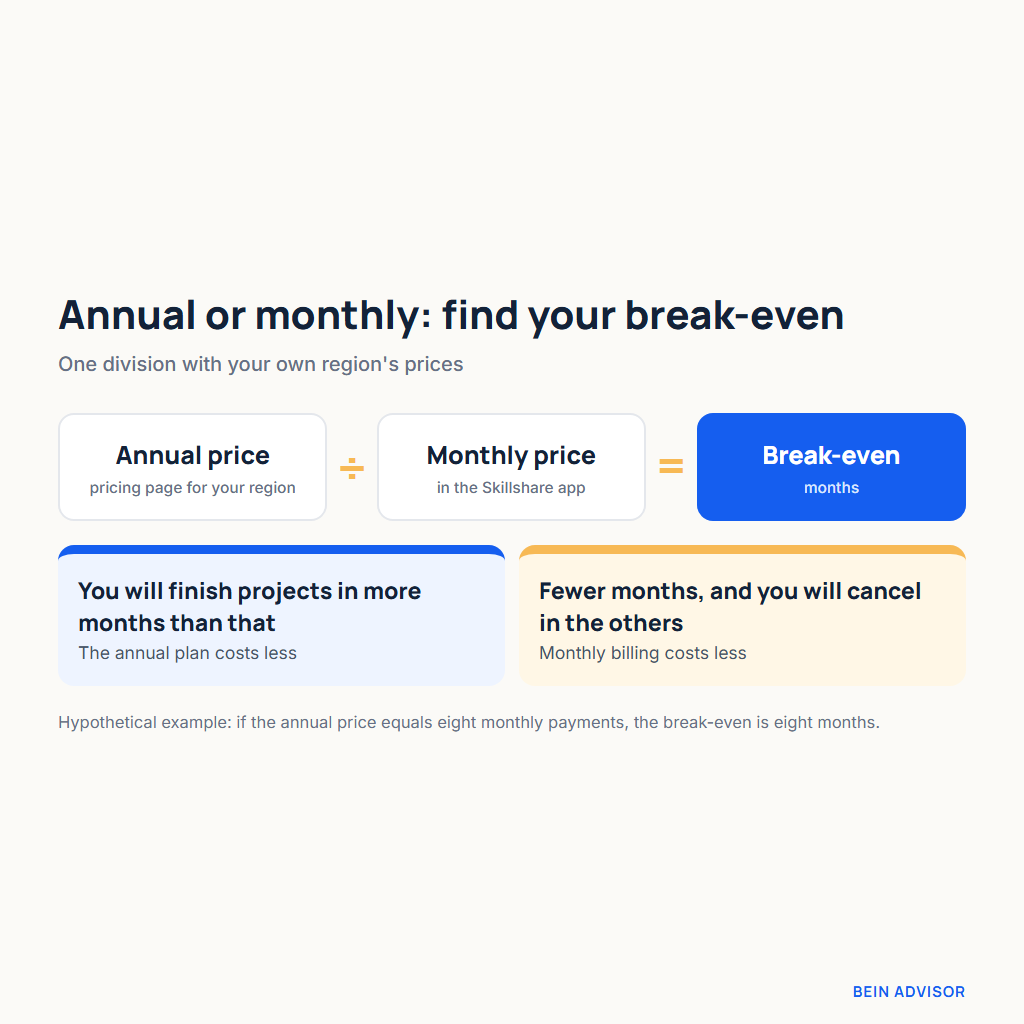
A simple calculation settles the plan question. Find the annual price on the pricing page for your region and the monthly price in the Skillshare app, then divide the annual price by the monthly price. The result is your break-even number: the count of paid months at which the annual plan stops costing more than monthly billing.
Here is a worked example with a hypothetical ratio, not a real price. Suppose the annual price equals eight monthly payments. If you expect to use your Skillshare membership in nine or more months of the year, the annual plan is therefore cheaper. On the other hand, if you expect to use it in six months and cancel in the others, monthly billing costs less, even though each monthly payment is higher than a twelfth of the annual price.
The hard part is counting honestly. Count only the months in which you would finish at least one class project, not the months in which you might open the app. For instance, a freelancer whose client work peaks in some seasons may have only a few free months a year. That freelancer should compare those free months with the break-even number before choosing an annual Skillshare membership.
One more check helps. Look back at any subscription you paid for in the past, such as a course platform or a design tool, and count the months you really used it. That record is a more reliable guide than an optimistic plan for the year ahead. In addition, if the monthly route through the app store suits your pattern, remember that its refunds follow the store’s process rather than Skillshare’s.
Free Trial, Renewal and Refund Rules
The trial comes first. Skillshare’s sign-up page offers “Start your free 7 days of unlimited classes,” and the trial requires payment details. If you do not cancel before the trial ends, Skillshare charges your payment method. Skillshare then bills you automatically until you cancel. In addition, the offer applies only to new paid subscribers. Trial length can also differ; for example, the refund page mentions both 7-day trials and trials of 14 days or longer.
The refund rules for a Skillshare membership depend on which charge you want back. The table below follows the Help Center’s refund page, which sets out each case separately.
| Situation | What the Help Center says |
|---|---|
| Charge after a 7-day trial | Contact Support within 48 hours of the charge for a one-time refund, if you have not used Skillshare since |
| Charge after a trial of 14 days or longer | No refund |
| Subscription renewal | No refund |
| Annual plan renewal notice | A reminder email arrives about 30 days before renewal |
| EU or UK subscriber | A 14-day cooling-off period may apply, and the trial counts toward it; in the UK, a new one may apply at annual renewal |
| App Store or Google Play purchase | Request the refund through that store; deleting the app does not cancel the subscription |
| Cancelling | Future billing stops, but no refund is issued; access continues to the end of the billing period |
| A second refund request | Not approved |

Read the first row closely, because it is the narrowest window in the table. The refund after a 7-day trial needs two conditions at once: you ask within 48 hours of the charge, and you have not used Skillshare since. Watching one lesson after the charge, however, removes the second condition. Therefore, if you decide against your Skillshare membership on the day of the charge, contact Support before you open a class.
The EU and UK row needs a second reading as well. A 14-day cooling-off period may apply there; however, the trial counts toward it. Consequently, a trial of 14 days or longer can leave little or none of that period after the first charge. In the UK, a new cooling-off period may also apply at an annual renewal.
How to Cancel a Skillshare Membership
Desktop cancellation takes three steps. Open Account Settings, choose Membership & Payments, and then select Cancel membership. If you subscribed on the web and are using the app, the Help Center says to cancel in a browser rather than in the app. In contrast, an App Store or Google Play subscription is managed through that store. Deleting the app from your phone, moreover, cancels nothing.
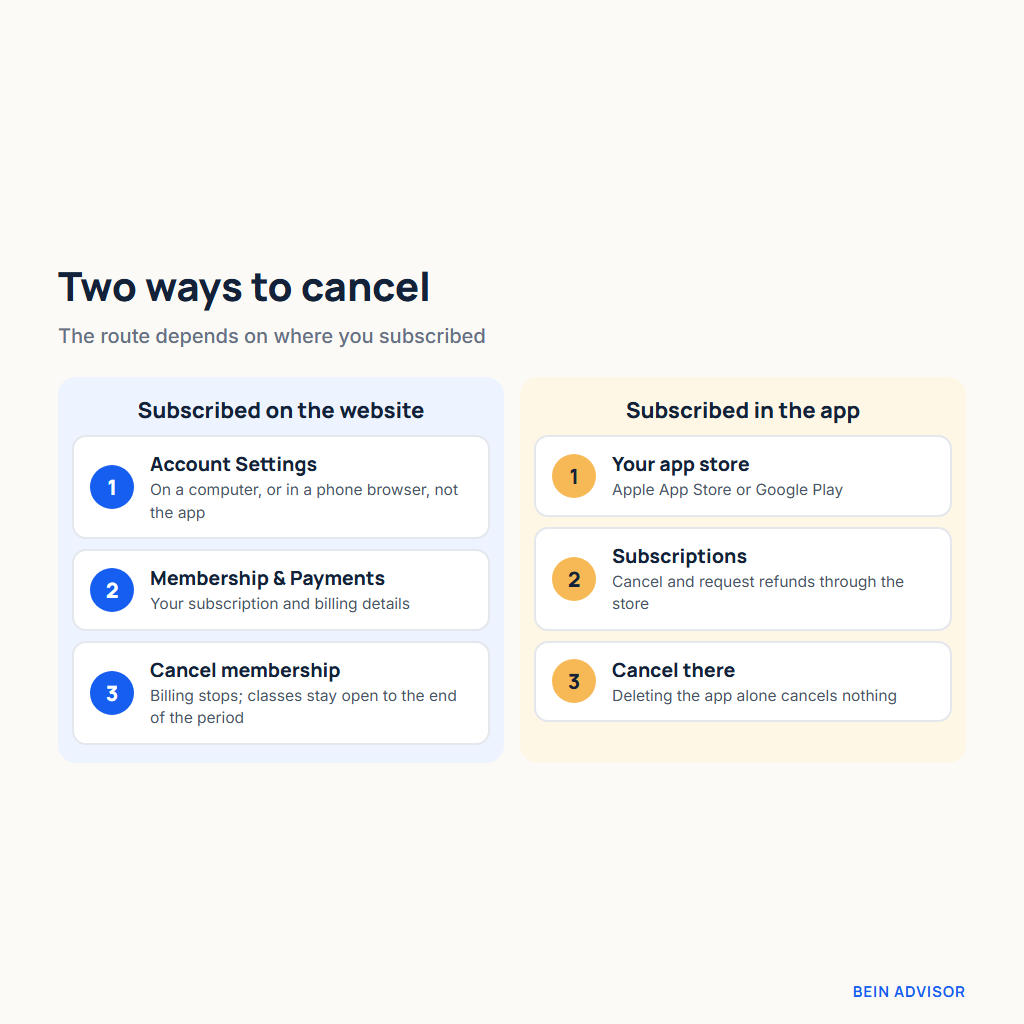
Cancelling a Skillshare membership early carries no access penalty. Your classes stay open until the end of the billing period you already paid for. As a result, you can cancel the day after the trial converts and still finish the class you started. In addition, the renewal reminder gives annual subscribers a fixed decision point. When that email arrives, about 30 days before renewal, open your own projects in the gallery. Then ask whether the past year produced enough finished work to justify another year.
What the Class Certificate Shows, and What It Does Not
You earn the certificate by meeting two conditions. According to Skillshare’s certificate page, you receive one after watching all the lessons of a class and submitting a project for it. Once issued, the certificate shows your name, the class title, the issue date, the teacher, the class length and a unique certificate ID. Those details therefore confirm that you completed one class, and nothing beyond that.
What the page does not say matters as much. Skillshare’s Help Center does not describe the certificate as accredited, so it should not be presented that way on a CV or a profile. In practice, it is a record of completion from one teacher’s class. Consequently, if your goal is a credential that employers recognise, compare platforms whose certificates come from universities or companies, such as Coursera and its certificate-led digital marketing courses, before you pay for a Skillshare membership.
For freelance creative work, however, the project itself is stronger evidence than the certificate. A client hiring an illustrator or a video editor looks at the work: the drawing, the edit, the layout. The certificate ID proves that you finished a class; the project, in contrast, shows what you can deliver. Ultimately, a portfolio of finished class projects is the real return on a Skillshare membership.
The same tension between certificates and proof of skill appears in other fields too. For example, people in the first months of a cybersecurity career face the same choice between certificates and demonstrable work. In a creative field, however, the proof is easier to show, because a client can look at the finished piece directly.
Teaching on Skillshare: How the Teacher Fund Pays
A creative with a Skillshare membership may also want to teach on the platform. Skillshare’s Help Center page Earn From Your Teaching explains how teachers are paid. Earnings come from the Teacher Fund, which is a portion of subscription revenue each month. The fund, in turn, is shared among teachers according to qualifying minutes watched. So pay depends on a share of minutes, not a fixed rate.
Eligibility has thresholds. A teacher needs 50 followers and a minimum of qualifying minutes watched. The bar is 400 qualifying minutes for a teacher with a class that Skillshare has designated a “quality class” in the past 18 months, and 650 qualifying minutes otherwise. However, minutes watched by members on a free trial, or through a free link, do not count. In addition, the Teacher Stats dashboard shows minutes watched, monthly earnings and any adjustments.

The payment date is fixed, but the amount is not. Payments go out on the 16th of the month through Tipalti, a payment service. Skillshare also says that future payouts cannot be estimated in advance. In fact, both the monthly pool and the minutes behind each share can vary. A $100 engagement reward exists as well. However, it goes only to active members of the Top Teacher and Rising Teacher programs who receive at least two new positive reviews in a given month.
Read together, these rules describe uncertain income. Therefore, no one should start teaching expecting a set amount. The design lesson carries over, though. A new teacher should build the same three signals into a first class: a clear brief, a finishable project and visible feedback. Ultimately, a finishable project gives members a reason to watch the class to the end.
Finish One Project Before Your Skillshare Membership Starts Billing
The trial is the cheapest test you will get. It costs nothing if you cancel in time, and it uses the same classes, projects and gallery as a paid Skillshare membership. So use it for the one thing the membership is supposed to deliver: a finished piece of work.
Pick one class that passes the three signals, put the trial’s end date in your calendar, and work toward its project from the first day. Before the trial ends, finish one class project and post it to the Project Gallery. If you could not finish one project in the trial, however, the Skillshare membership is not for you yet; cancel, and come back when you have the hours to use it.