

A first invoice of two dollars a month feels like a bargain. Three years later the same plan renews at nine times that price, on a server that can no longer carry the traffic. Web hosting punishes decisions made in a hurry, and it does so quietly. The trap is rarely a bad provider. Instead, it is a plan chosen against the wrong criteria, on a promotion that was never meant to last.
Most beginners compare the wrong column. They line up monthly prices and pick the smallest number. However, price is the one variable that changes most between the first term and the second. Meanwhile the variables that actually decide whether a site loads fast, stays online, and can move elsewhere sit further down the page. Those variables are harder to read, and providers rarely put them in the headline.
This article works through six rules that govern the decision. Each rule covers one area where the cost of getting it wrong compounds over time: what you are actually renting, which type fits your project, how renewal pricing really works, which performance limits bind you, what support and migration are worth, and how to run the final check. Read them in order. Consequently, the choice at the end becomes a short verification rather than a guess.
1. What Web Hosting Actually Buys You
Every hosting plan is two purchases bundled into one price. The first is a slice of a physical server: processor time, memory, and disk space. The second is a stack of services layered on top, including backups, security scanning, email, and a control panel. Providers compete mostly on the second purchase, because the first is close to a commodity. Understanding the split matters for one practical reason. When a plan feels slow, the fix usually lies in the first purchase. In contrast, when a plan feels frustrating to operate, the problem sits in the second.
1.1 The Server Resources You Rent
Underneath every website sits a computer that answers requests. Your plan grants you a defined share of that machine. The share is expressed through several numbers: CPU cores or a percentage of them, RAM in gigabytes, storage in gigabytes, and often a cap on simultaneous processes. Shared plans divide one server among many customers, which keeps the price low. Additionally, that division is why performance varies through the day. Your neighbours consume the same pool you do. As a result, a plan that felt quick during setup can feel sluggish once a neighbouring site runs a heavy backup.
Storage type deserves particular attention, because it changes response times more than raw capacity does. NVMe drives answer database queries noticeably faster than older SATA solid-state drives. For a content site, the database handles nearly every page view. Therefore the drive standard affects real browsing speed, not just file transfers. Look for the storage technology in the specification table rather than the marketing copy. Furthermore, check whether the quoted storage figure includes backups and email. Some providers count all three against one total. That accounting choice can consume half your allowance before you publish anything.
1.2 The Services Bundled Around Web Hosting
Around the server sits everything that makes it usable. A control panel handles domains, databases, and file access. An SSL certificate encrypts the connection, and it is now mandatory for every install rather than an upgrade. Automated backups copy your site on a schedule. Staging environments let you test changes safely before they reach visitors. Moreover, a content delivery network caches static files closer to your readers. Each of these can be bought separately. Nevertheless, a bundled plan usually costs less than assembling the same stack from individual vendors, provided you would genuinely use every piece.
Backups repay the closest reading of any bundled service. Two questions decide their value. How far back does the archive reach, and can you restore without contacting support? A daily backup retained for seven days protects against an accident you notice quickly. In contrast, it cannot help with a problem introduced three weeks ago. Self-service restore matters just as much. When a restore requires a support ticket, recovery time depends on someone else’s queue. For instance, a site that breaks on a Friday evening may wait until Monday. Consequently, verify both retention and restore access before you commit.

2. Types of Web Hosting and Who Each Suits
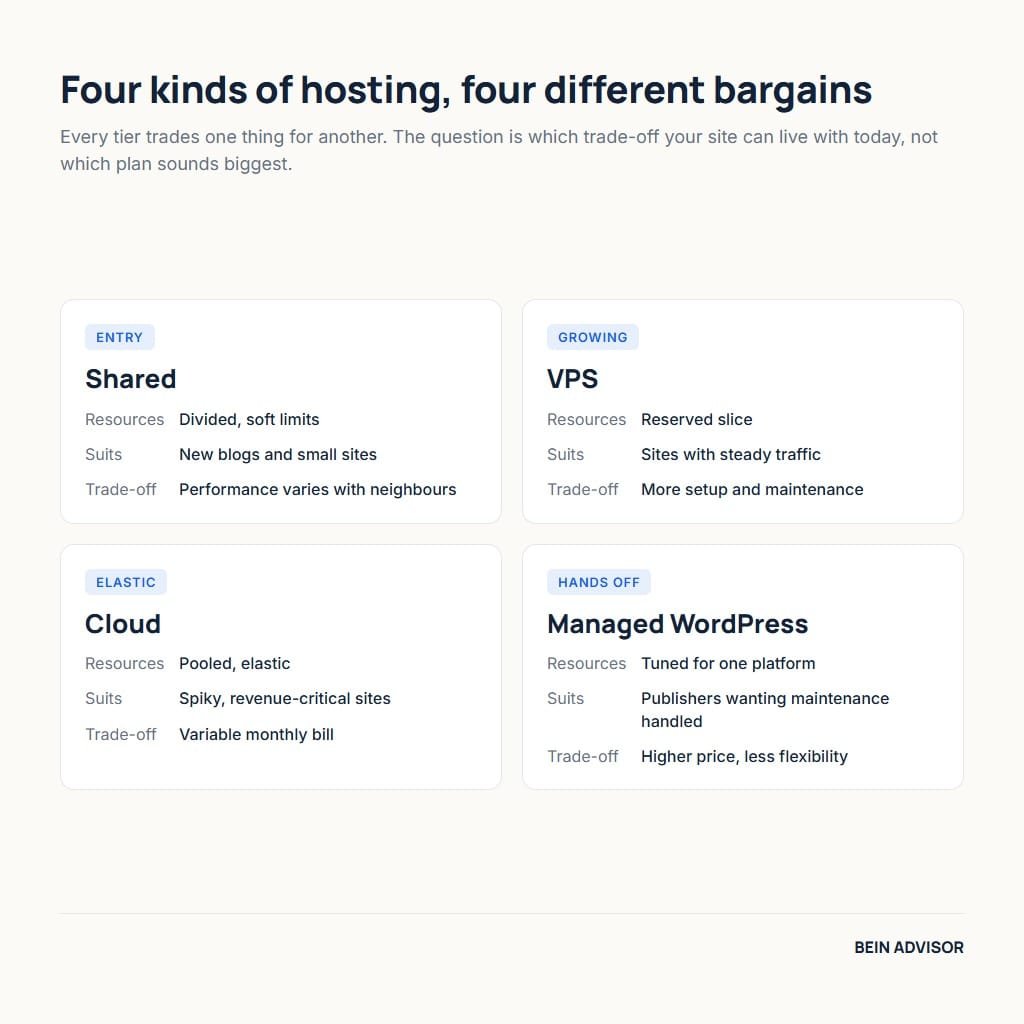
Hosting types differ mainly in how the underlying machine is divided. Shared plans split one server among many accounts with soft limits. Virtual private servers carve the machine into isolated slices with guaranteed resources. Cloud plans spread the workload across a pool of machines and bill for what you consume. Managed WordPress plans add software-specific tuning on top of any of these. Choosing between them is less about ambition and more about traffic shape. Therefore the honest question is not which tier sounds professional, but which one matches the load you actually have today.
2.1 Shared Web Hosting and Its Real Ceiling
Shared plans remain the right starting point for most new sites. A blog, a portfolio, or a small brochure site rarely exceeds the resources on offer. The economics are straightforward: dividing one server among many customers lowers everyone’s bill. Additionally, the provider handles operating system updates and server security. That removes a category of work most beginners are not equipped to do. For a site publishing a few articles a week, this tier is sufficient for a long time. In fact, many sites outgrow their content strategy long before they outgrow shared hosting.
The ceiling appears in a specific way, and it is worth recognising early. Shared plans limit concurrent processes rather than monthly visits. A site can serve large monthly totals comfortably while failing during a short spike. When twenty readers arrive at once from a social post, the queue fills and later requests wait. Consequently the symptom is intermittent slowness under bursts, not a steady decline. Watch for rising response times during your busiest hour rather than watching the monthly bandwidth figure. That single habit tells you when the tier no longer fits.
2.2 VPS and Cloud Web Hosting
A virtual private server reserves resources for your account alone. Neighbours can no longer consume your share, which makes performance predictable rather than merely fast. Cloud plans go further by distributing the workload across several machines. That design absorbs traffic spikes gracefully and removes the single point of failure. Both tiers cost more, and both usually assume more technical comfort. However, managed versions of each now exist, where the provider handles maintenance for a premium. For a site earning revenue, predictability often justifies the difference more than raw speed does.
Timing the move matters more than choosing the destination. Upgrading too early wastes money on capacity that sits idle. Meanwhile upgrading too late costs traffic during the exact weeks when growth arrives. A useful trigger is sustained rather than occasional pressure: response times degrading during peak hours across several weeks, or resource warnings appearing in your control panel regularly. Similarly, an approaching launch with known demand justifies moving in advance. Outside those conditions, money spent on a bigger tier usually returns more when spent on caching and front-end optimisation instead.
| Type | Resources | Best suited to | Main trade-off |
|---|---|---|---|
| Shared | Divided, soft limits | New blogs, portfolios, small business sites | Performance varies with neighbours |
| VPS | Reserved slice | Growing sites with steady traffic | More setup and maintenance |
| Cloud | Pooled, elastic | Spiky traffic, revenue-critical sites | Variable monthly bill |
| Managed WordPress | Tuned for one platform | Publishers who want maintenance handled | Higher price, less flexibility |
3. Web Hosting Costs and the Renewal Gap
Introductory pricing is the single most misread element of the industry. The advertised figure applies to a first term, and it usually requires paying that whole term upfront. Renewal then moves to standard pricing, which is frequently three to five times higher. None of this is hidden, yet it sits in small print beside the button. The practical consequence is that comparing headline prices compares two different things. Therefore the only fair comparison uses total cost across the first two terms, including the renewal you will actually pay.
3.1 Why the First Term Looks So Cheap
Providers price the first term as customer acquisition rather than as service delivery. Migrating a website is inconvenient, so most customers renew rather than move. That predictable inertia makes a heavy first-term discount profitable over a multi-year relationship. Understanding the mechanism removes any sense of being tricked. In fact, the discount is genuinely available, and taking it is often rational. What matters is entering with accurate expectations. Consequently you should read the renewal rate before purchase and treat it, not the promotion, as the real price of the plan.
Term length interacts with this in a way worth planning around. Longer commitments carry deeper discounts, which tempts beginners toward four-year contracts. Nevertheless a long term also locks you into a decision made with the least information you will ever have about your own project. A twelve-month term is usually the sensible compromise. It captures most of the discount while leaving room to reassess once you know your real traffic. Additionally, shorter terms make it easier to move if support quality disappoints, which is the failure mode that specifications never reveal.
3.2 Calculating True Web Hosting Cost
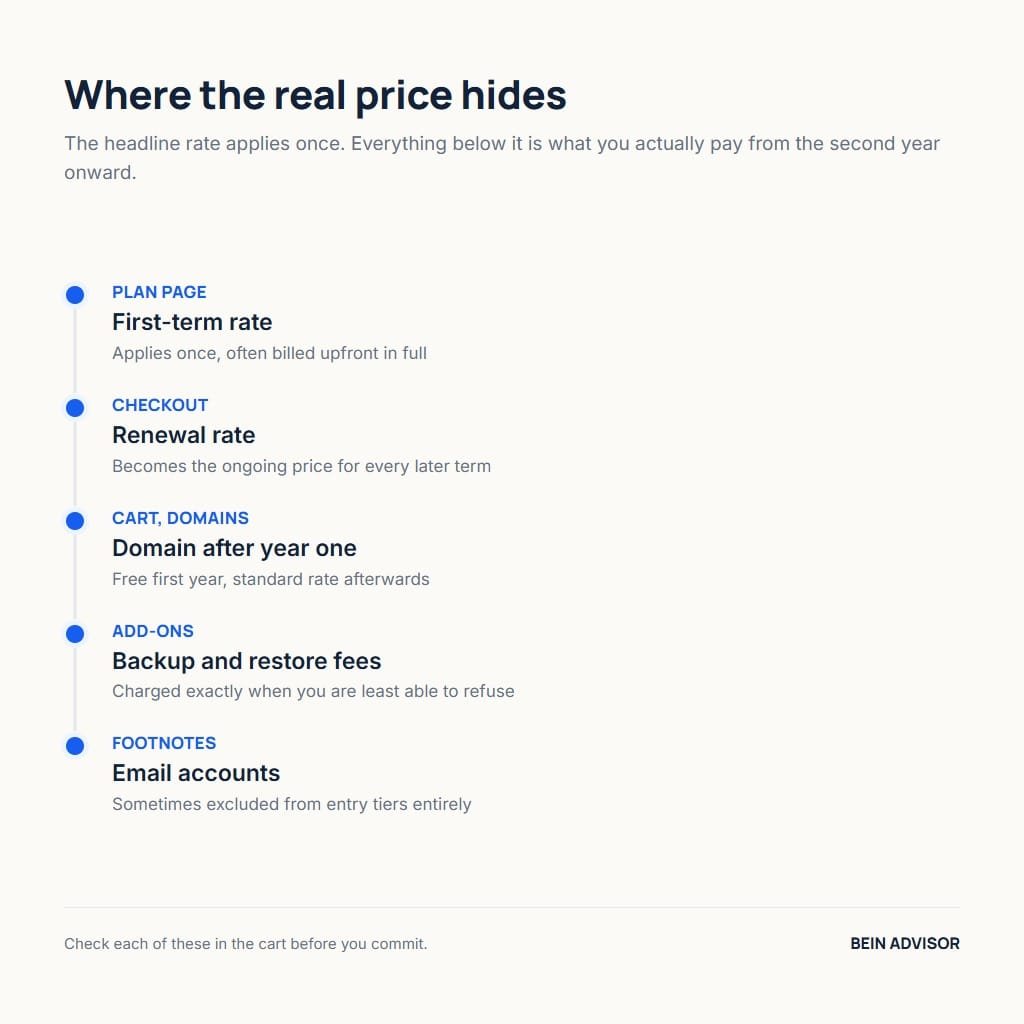
A reliable calculation takes about five minutes and changes many decisions. Add the full first-term charge to the full renewal-term charge, then divide by the total number of months. That figure is your genuine monthly cost. Next, add the items billed separately. Domain privacy, dedicated addresses, premium backups, and email accounts often sit outside the plan price. Furthermore, some providers charge for restoring a backup, which turns an emergency into an invoice. Listing these before purchase prevents the common experience of a bill that keeps growing after signup.
The table below shows how the arithmetic reorders a comparison. Two plans advertised at similar monthly rates can diverge sharply once renewal enters. Notice that the cheapest first term is not the cheapest two-year total. For instance, a plan at a very low promotional rate with an aggressive renewal often costs more overall than a moderately priced plan with a gentle increase. Therefore run this calculation for every shortlisted provider. It is the single step that most reliably prevents regret, and it requires nothing beyond their own published pricing page.
| Cost element | Where to find it | Why it changes the total |
|---|---|---|
| First-term rate | Headline price on the plan page | Applies once, often billed upfront in full |
| Renewal rate | Small print or checkout summary | Becomes the ongoing price for every later term |
| Domain after year one | Domain section of the cart | Free first year, standard rate afterwards |
| Backup and restore fees | Add-ons or knowledge base | Charged exactly when you are least able to refuse |
| Email accounts | Plan comparison footnotes | Sometimes excluded from entry tiers entirely |
4. Performance Limits That Bind Your Web Hosting
Speed claims in marketing copy rarely translate into measurable outcomes. What binds real performance is a small set of limits, and most of them appear in the specification table rather than the sales page. Concurrent process caps, memory ceilings, database query limits, and server location together explain most speed complaints. Additionally, the software stack matters: newer PHP versions execute markedly faster than older ones. Reading these four or five figures tells you more about future speed than any published benchmark. Consequently they deserve more attention than the adjectives surrounding them.
4.1 Reading Resource Caps Honestly
The word unlimited appears often, and it never means unlimited. Storage described that way is governed by an acceptable use policy elsewhere in the terms. Bandwidth described that way is throttled once a threshold is crossed. Neither practice is dishonest, yet both make comparison harder. The useful figures sit beside them: entry processes, input/output throughput, and memory per process. Furthermore, these are the numbers support will quote back to you when a site slows down. Knowing them in advance turns a confusing incident into a predictable capacity conversation.
Software versions form the other half of this picture, and they are easy to check. WordPress recommends running PHP 8.3 or greater with MariaDB 10.11 or MySQL 8.0, alongside HTTPS on every install. Older versions still function, yet they run slower and carry security exposure. Therefore confirm which versions a provider offers, and confirm you can switch versions yourself from the control panel. A host that keeps you on an end-of-life release is imposing a hidden cost. In contrast, one that lets you upgrade freely gives you a performance lever that costs nothing.
4.2 Server Location and Measured Speed
Physical distance between server and reader adds latency that no software removes entirely. A site hosted in North America but read primarily in the Gulf carries a measurable penalty on every request. Choosing a data centre near your main audience is therefore one of the cheapest performance decisions available. Most providers let you select a region at checkout, and changing it later requires migration. For instance, a regional audience served from a nearby region can gain a noticeable share of its load time back. Similarly, a content delivery network reduces the penalty for static files, though not for database queries.
Measurement should replace impression once the site exists. Google’s Core Web Vitals define three field metrics: Largest Contentful Paint within 2.5 seconds, Interaction to Next Paint at or below 200 milliseconds, and Cumulative Layout Shift at or below 0.1. These are assessed at the seventy-fifth percentile across real visits. Consequently they reflect what readers experience rather than what a single test run reports. Track them monthly. When they degrade steadily rather than occasionally, the hosting tier has become the constraint, and an upgrade is finally justified.

5. Web Hosting Support, Backups, and Migration
Support quality is invisible during comparison and decisive during incidents. Every provider advertises availability around the clock, so the claim carries little information. What varies is the depth of the first response and whether the agent can act rather than escalate. Migration policy sits beside this, because the freedom to leave shapes your leverage to stay. Additionally, backup access determines how quickly a bad day ends. These three factors rarely appear in comparison tables. Nevertheless they explain most of the difference between a provider people recommend and one they tolerate.
5.1 What Usable Support Looks Like
Test support before you need it, using a question with a verifiable answer. Ask which PHP versions are available and how to switch between them. A capable team answers directly and points to the exact control panel path. In contrast, a weak team sends a generic article that does not address the question. The exercise costs ten minutes and reveals more than any review score. Furthermore, note the channel mix. Live chat suits quick configuration questions, while ticket systems handle complex faults better because they preserve context across shifts.
Scope of support matters as much as speed of reply. Many providers draw a firm line at the server boundary and decline to help with site software. That policy is reasonable, yet it must be known in advance. When a plugin conflict takes a site down, a server-only support desk cannot assist. Managed plans usually extend further into the application layer, which is a large part of what their premium buys. Therefore match the support scope to your own technical comfort. Paying for help you can provide yourself wastes money, while lacking help you cannot provide costs downtime.
5.2 Migration Freedom and Lock-in
Ask how you would leave before you decide to arrive. The answer reveals the architecture underneath. A standard setup with full file and database access lets you move to almost any competitor. Meanwhile a heavily proprietary platform can make export slow and partial. Free migration offers are common and genuinely useful, though they usually apply on arrival rather than departure. Consequently the question to ask is not whether they will move you in, but whether nothing prevents you from moving out. That distinction protects you for years.
Domain registration is the quiet part of lock-in, and separating it costs nothing. Registering your domain with the same company that hosts your site is convenient, yet it concentrates risk. When a billing dispute or an account suspension occurs, both your site and your domain sit behind the same locked door. Registering the domain with an independent registrar keeps the two separable. Similarly, keeping an off-site copy of your backups means no single provider decision can strand you. Neither habit costs meaningful money, and both convert a potential crisis into an inconvenience.
6. How to Choose Web Hosting Without Regret
The decision becomes simple once the preceding rules are applied in sequence. Start from your project rather than from the plan list. Estimate the traffic you have now instead of the traffic you hope for. Then filter providers by the specifications that bind performance, calculate two-year cost, and test support with one real question. Finally, confirm the exit path. Following that order avoids the most common failure, which is choosing on price and discovering the constraints afterwards. Consequently the final selection tends to be obvious rather than agonising.
6.1 A Short Verification Checklist
Work through six confirmations before paying. Renewal rate: locate the figure and accept it as the real price. Resource caps: find entry processes, memory, and storage type. Software versions: confirm current PHP and database releases with self-service switching. Backups: check retention length and whether you can restore without a ticket. Region: select the data centre nearest your audience. Exit: verify full file and database access. Each item takes a minute, and together they cover every failure mode described above.
Providers worth shortlisting differ by situation rather than by ranking. Budget-oriented options such as Hostinger suit new sites where the first-term price genuinely matters, and our detailed look at Hostinger covers where that fit holds. Performance-oriented options such as SiteGround appeal to publishers who prioritise consistent response times. Meanwhile Cloudways and similar managed cloud services suit projects with uneven traffic and some technical confidence. Therefore the shortlist should contain one option per situation, and the checklist above decides between them on evidence rather than reputation.
6.2 Web Hosting Mistakes That Cost Most
Four mistakes account for most regret, and each has a cheap remedy. Buying the longest term for the deepest discount locks in a decision made without data; a twelve-month term avoids it. Choosing purely on advertised price ignores renewal; the two-year calculation avoids it. Selecting a distant data centre adds permanent latency; picking by audience location avoids it. Finally, registering the domain with the host concentrates risk; an independent registrar avoids it. Notice that none of these remedies requires technical skill. Instead, each requires one deliberate check at the moment of purchase.
A fifth mistake deserves separate mention because it is invisible at purchase. Many beginners upgrade hosting to fix a speed problem created by the site itself. Unoptimised images, excessive plugins, and missing caching slow a page far more than a modest server does. Consequently the upgrade delivers a small improvement at a permanent cost. Measure first, using the field metrics described earlier. When the numbers point at server response times, upgrade with confidence. When they point at page weight, the money returns more if spent on the site rather than the plan.
Conclusion: Web Hosting Decisions Worth Making Once
Web hosting rewards patience at exactly one moment: the hour before purchase. Every rule in this article reduces to a small number of checks that are trivial then and expensive later. Read the renewal rate rather than the promotion. Read the resource caps rather than the adjectives. Choose the region by audience, keep the domain separate, and confirm you could leave. Consequently the plan you select will still make sense when the second invoice arrives.
Start with the checklist rather than the comparison table. Open the pricing page of two providers you are considering, and fill in six figures for each: renewal rate, two-year total, entry processes, storage type, backup retention, and data centre region. The gap between them will usually be clear within ten minutes. Web hosting chosen that way rarely needs revisiting, which is the entire point. Afterwards, spend your attention on the site itself, where the returns are far larger.
Practical Books for Choosing Web Hosting
As an Amazon Associate, BeIN ADVISOR earns from qualifying purchases.
These books can help you understand hosting terminology, but they do not replace reading the provider’s current terms, renewal price, resource caps, backup policy, or migration rules. Check the live listing and price before buying.
Web Hosting For Dummies: The listing presents this book as a beginner-friendly guide to web hosting. It can help a new site owner learn the vocabulary behind shared hosting, domains, control panels, and provider comparisons; verify every current specification with the host you are considering.

Modern Web Development: The listing describes a beginner guide covering HTML, CSS, hosting, and SEO. It is useful when hosting decisions sit alongside basic site building, but it cannot guarantee speed, indexing, or business results.

WordPress Web Hosting: The listing identifies a guide focused on WordPress hosting and cPanel control. It can help a beginner understand the hosting panel and setup steps; compare its examples with the provider’s current interface before acting.

Use the books as optional study aids; the final hosting choice should come from measured needs, current terms, backups, and an exit plan.