

A SaaS review website can look polished and still leave readers unable to choose. Stars alone do not tell them whether a tool fits a small team, a solo operator, or a company with strict approval rules. Nor does a fast theme create a fair test, and a shortened affiliate link cannot make a recommendation independent. The useful work happens when the site connects a repeatable review method to a small, maintainable publishing stack.
This guide compares five practical layers for a SaaS review website: WordPress as the content base, GeneratePress as a lightweight publishing surface, reusable block templates for comparisons, WP Review Pro for visible scoring, and ThirstyAffiliates for link operations. The important point is the order. You should not install every layer on day one. First define what a trustworthy review must show, then add the tool that solves the next real bottleneck.
A SaaS review website also needs a clear boundary between editorial proof and commercial convenience. The stack can make that boundary visible, but it cannot create it for you. Treat every tool as a way to support a decision that the article has already explained.
That boundary is the real advantage of a documented SaaS review website: readers can follow the reasoning even when they choose a different product.
You will also get a launch workflow, a maintenance checklist, and a staged buying plan. Feature descriptions come from official product or WordPress documentation, while the editorial recommendations are a practical framework rather than a promise of rankings, traffic, or affiliate income. Treat every price, license, and integration as something to verify on the vendor’s current page before purchase.
1. What a SaaS review website must prove before it sells anything
A credible SaaS review website answers a narrower question than “Is this software good?” It explains what the tool does, who benefits, what task was tested, what happened during the test, and where the product becomes a poor fit. That evidence gives a rating meaning. Without it, the same five stars can describe an elegant interface, a generous free plan, or a reviewer who simply liked the brand.
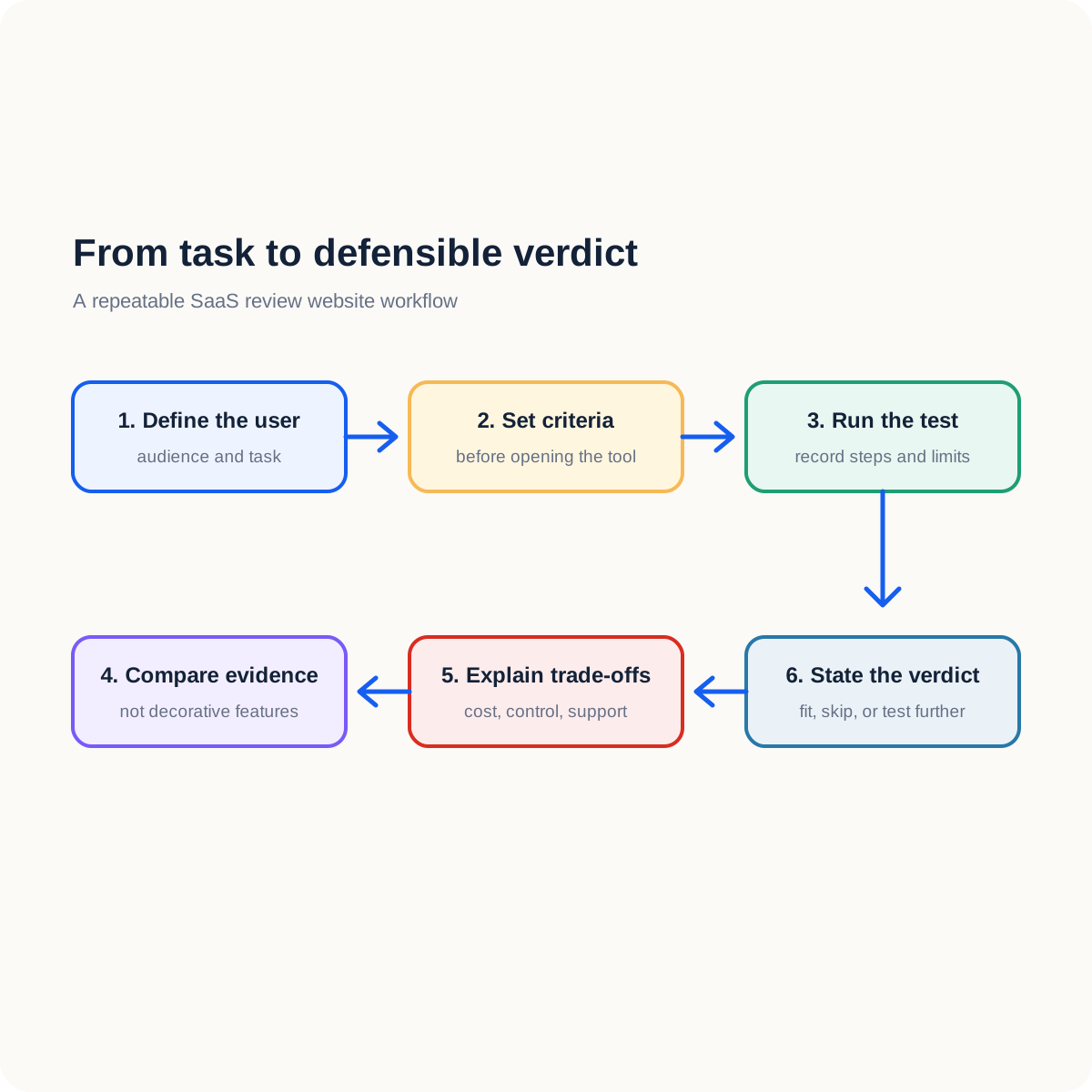
Set the criteria before opening the vendor’s affiliate dashboard. A useful starter set includes first-run clarity, core task coverage, integration quality, control over data and exports, support documentation, and total effort. You can change the weights for a specialist category, but record why. A security tool should not receive the same weighting as a visual landing-page builder, and a product for a small team should not be judged only by enterprise permissions.
| Review layer | Question | Evidence to collect |
|---|---|---|
| Audience | Who should use the product? | A specific user and situation |
| Task | What did you ask the product to do? | A repeatable test path |
| Trade-off | What does the buyer give up? | A limitation or cost in context |
| Verdict | What is the next sensible action? | Try, shortlist, or skip with a reason |
This method changes how you build a SaaS review website. The visual stack of a SaaS review website becomes a delivery system for evidence rather than a substitute for it. Your theme should make the test easy to follow. The comparison table should expose differences. Your rating block should summarize the reasoning already visible in the text. A documented SaaS review website makes those jobs easier to audit.
2. The five-layer stack at a glance
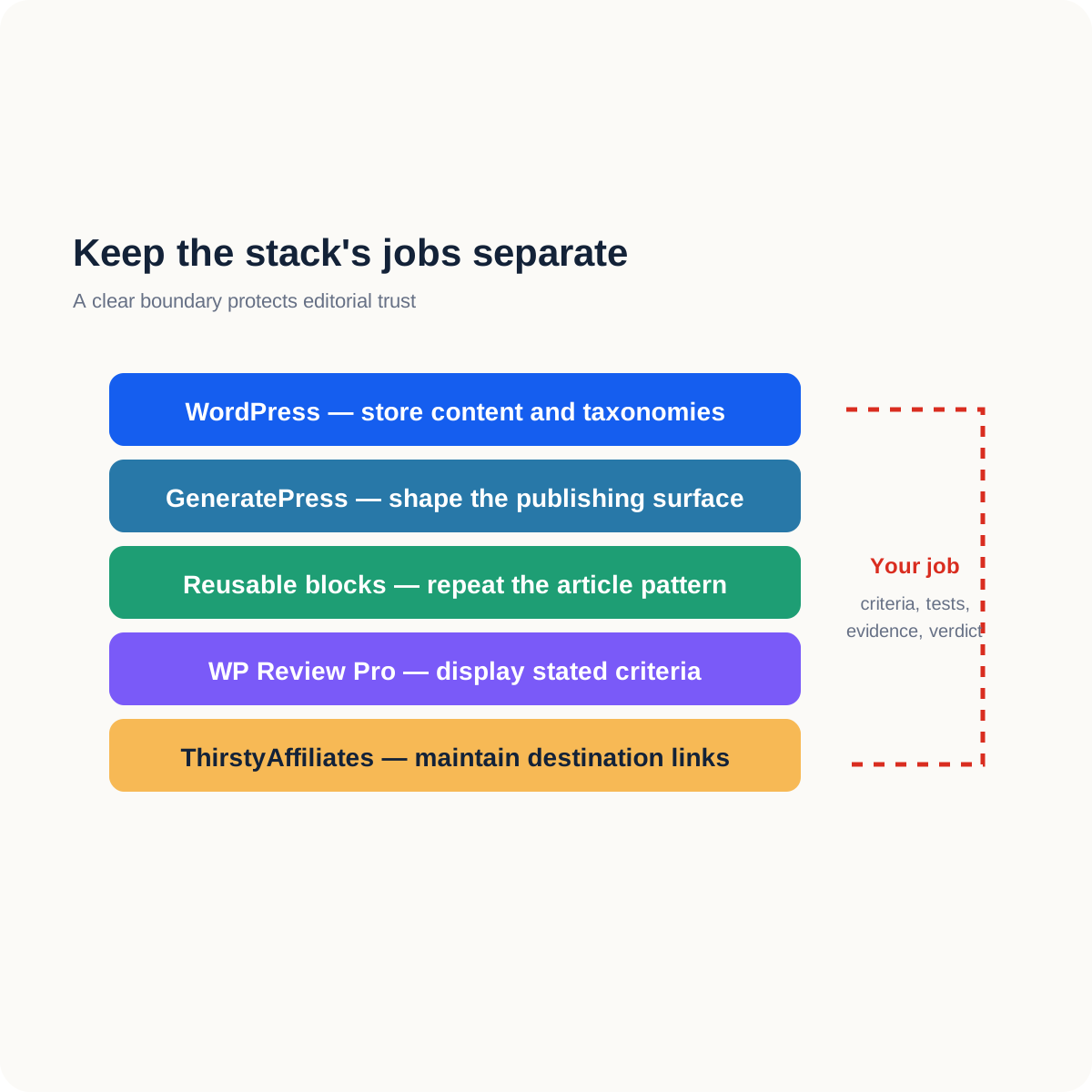
The five tools below are not five interchangeable “best” picks. They solve different jobs. WordPress stores and organizes the content. GeneratePress shapes the publishing surface. The block editor and reusable patterns keep the review structure consistent. WP Review Pro can turn chosen criteria into a visible score. ThirstyAffiliates keeps commercial links centralized and auditable. A smaller stack is often safer than a larger one because every extra component creates another update and compatibility decision.
| Layer | Primary job | Add it when… | Do not expect it to… |
|---|---|---|---|
| WordPress | Store posts, taxonomies, media, and drafts | You need a flexible editorial base | Choose your editorial standards |
| GeneratePress | Build a light, adjustable theme surface | Your archive and article layout need control | Write or test reviews |
| Reusable blocks | Repeat comparison sections without copying mistakes | You have a stable article pattern | Replace human judgment |
| WP Review Pro | Display structured ratings and review boxes | Scores recur across several reviews | Prove a score by itself |
| ThirstyAffiliates | Organize and monitor commercial links | Manual link changes become risky | Decide which product is best |
The most important decision is not which product appears first in a list. It is whether the layers have clean boundaries. If the theme owns review logic, changing themes can damage the archive. If the affiliate plugin owns your verdict, editorial trust becomes harder to explain. Keep the content, the score method, and the destination link understandable as separate pieces.
3. GeneratePress for a SaaS review website
GeneratePress describes itself as a lightweight WordPress theme focused on speed, stability, and accessibility. Its official material also presents starter sites, block-based building, layout controls, hooks, local font options, and responsive navigation. Those features suit a SaaS review website because readers often move between an archive, a comparison page, and a long review. A consistent shell reduces that navigation friction.

Read the GeneratePress theme page and its getting-started documentation as two separate decisions: the free theme can provide the foundation, while premium modules and starter-site workflows add more control. Do not treat a premium feature as necessary unless it solves a layout or maintenance problem you can name.
| Need on the review site | Where GeneratePress helps | What remains your responsibility |
|---|---|---|
| Clear article hierarchy | Templates, layout, navigation, and content areas | Writing a useful introduction and verdict |
| Many categories | Archive and post layout controls | A taxonomy that reflects reader intent |
| Mobile reading | Responsive options and a lighter surface | Testing tables, buttons, and images on phones |
| Reusable design | Elements and block-based patterns | Keeping the pattern accessible and readable |
The theme cannot decide whether a SaaS review website is fair, whether a claim is sourced, or whether your affiliate disclosure is visible enough. It also cannot compensate for an overloaded page builder or oversized screenshots. Keep the first design narrow: one article column, one useful sidebar or no sidebar, a clear comparison table, and a verdict that does not hide the caveat.
Theme speed deserves its own test, and the WordPress theme-speed comparison covers it in depth. Here, the theme is one layer of a review workflow rather than the subject itself.
4. Reusable blocks for a SaaS review website
The native block editor is the quiet fifth tool in this stack because it controls how evidence is assembled. Create a review pattern with a summary, test conditions, criteria, result table, limitations, alternatives, and conclusion. Reuse the pattern only after the functions are stable. A template should prevent forgotten sections, not force every product into identical prose.
Use tables for compact differences such as integrations, export options, or audience fit. Use paragraphs for judgments and context. On a narrow screen, a table with six long columns becomes a horizontal obstacle, so reduce the columns or split the comparison into two tables. Save a clean pattern and test it in the editor and on the public page before applying it to a library of posts.
- Put the audience and the tested task near the top of every review.
- Separate vendor claims from what you actually observed.
- Give the reader a reason for each weighted criterion.
- Keep a plain-language caveat beside the rating, not after the commercial button.
- Use the same labels for the same criteria across a comparison group.
This is where a SaaS review website gains a defensible identity. The reader may disagree with your final score, but can still understand how you reached it. That is more durable than a decorative review card that looks impressive until two products use different standards.
5. WP Review Pro for visible scoring—after criteria exist
WP Review Pro’s official product page lists star, percentage, circle, and point formats, along with rating displays, responsive output, shortcodes, widgets, and rich-snippet-related features. Those options can make a repeated review format easier to scan. They do not make a test accurate. A rating system is a display layer whose value depends on the criteria and evidence behind it.

Before installing it, write three sample reviews in plain blocks and calculate the results by hand. If the criteria are still changing, the plugin will only help you polish an unstable method. Once the method repeats, use a rating box to summarize the article, then keep the explanation in normal text so the page remains useful if you later change plugins.
| Criterion | Illustrative weight | Test question | A reason to lower the score |
|---|---|---|---|
| First run | 20% | Can a new user complete the first task? | The setup hides a required step |
| Core work | 30% | Does the main feature solve the stated problem? | The feature exists but fails the test |
| Control | 20% | Can the buyer change or export the result? | The product locks essential data |
| Support | 15% | Can the user find a dependable answer? | Docs are incomplete or unclear |
| Value | 15% | Does the plan fit the intended user? | The buyer pays for unused complexity |
Use these numbers only as an example. A review of a team database may give data export more weight than visual polish. A review of a landing-page builder may reverse that balance. Publish the weighting beside the score, and avoid words such as “guaranteed winner” or “best for everyone.” The goal is a transparent shortlist, not a universal ranking.
Also check how the rating appears on phones and in archives. A small thumbnail badge should not be the only place where the verdict is visible. If you use structured data, describe only what the page genuinely supports and follow the search engine’s guidance. A rich result is not guaranteed merely because a plugin can output markup.
6. ThirstyAffiliates for a SaaS review website
ThirstyAffiliates is built for affiliate-link management inside WordPress. Its official feature material describes categories, click reporting, keyword autolinking, geolocation options, smart uncloaking for Amazon, broken-link checks, scheduled links, and imports. On a SaaS review website, the main benefit is operational: you can update a destination in one place instead of hunting through old articles.

Start with a small taxonomy: email tools, project tools, writing tools, and design tools. Use names that help you find the link later. Record the original destination, the program terms, and the reason the link belongs in the article. Then use the official setup guide to create a link, choose a slug, select the redirect behavior, and assign a category.
- Keep the commercial disclosure next to the links it explains.
- Check the destination after a major plugin or theme update.
- Do not let keyword autolinking turn every mention into a sales prompt.
- Use click reports to understand behavior, not to rewrite an honest verdict.
- Review the merchant’s rules before hiding or redirecting a link.
A centralized link tool also creates a new responsibility: one wrong destination can affect many posts. Keep a short change log, test a representative article after edits, and preserve the wording that tells the reader what will happen after the click. A clean URL is useful, but clarity and compliance come first.
7. Build the first SaaS review website workflow in seven passes
The first ten reviews should be treated as a controlled publishing experiment. Repeat the workflow, record what breaks, and improve the pattern at deliberate checkpoints. Do not add a new plugin every time a paragraph feels awkward; sometimes the missing piece is a better test or a clearer sentence.

- Choose a narrow software category and name the user you will serve.
- Write five criteria and define what a passing test looks like for each.
- Run the same core task on the product and record the steps, limits, and surprises.
- Draft the review in blocks with a visible method and a concise comparison table.
- Add a rating only after the written evidence supports the score.
- Add a commercial link where the reader has enough context to decide.
- Read the public page on a phone, verify the links, and schedule a review date.
For example, if you review email platforms, the first test might be to create a list, send a simple message, inspect the report, and export the contacts. The exact steps matter less than repeating them across the shortlist. Note what the free plan restricts, what the interface hides, and what happens when a user wants to leave. A useful SaaS review website records those practical edges instead of repeating a feature list. While the site is small, a spreadsheet can do this before it needs more automation.
| Pass | Deliverable | Quality question |
|---|---|---|
| Scope | One user and one core task | Can a reader see why this product is being tested? |
| Evidence | Steps, screenshots, and limits | Could another reviewer reproduce the path? |
| Structure | Blocks, table, and verdict | Can a phone reader find the decision quickly? |
| Commercial layer | Disclosure and maintained link | Is the relationship clear before the click? |
| Review cycle | Update note and next check | Will you know when the page needs attention? |
8. Mistakes that make a review site look sponsored
A SaaS review website begins to look sponsored when the commercial relationship seems to determine the conclusion. That can happen even when the reviewer did not intend to mislead. A bright button before the test, a perfect score with no caveat, and a missing alternative all send the same signal: the page wants a click more than it wants to help. A trustworthy SaaS review website puts evidence before the commercial path.
- Putting the highest score on the product with the strongest commission without an editorial reason.
- Copying vendor adjectives such as “effortless” or “unbeatable” as if they were test results.
- Using one criterion for one product and a different criterion for its competitor.
- Burying limitations after the price or button.
- Publishing a rating before the reviewer has completed the core task.
- Leaving an old screenshot or broken destination in a high-traffic comparison.
- Treating traffic and clicks as proof that a product is good.
The repair is editorial separation. State the observation, explain its consequence for the intended reader, then place the commercial path beside the decision. If a product is not a fit, say so. A transparent “skip this if…” line often helps the right reader more than another positive adjective.
9. A buying order for a SaaS review website
| Site stage | Spend attention on | Delay until needed |
|---|---|---|
| Before the first review | WordPress, a light theme, backup, and a review pattern | Visitor ratings and complex filters |
| One to five reviews | Stable criteria, comparison tables, and disclosures | Site-wide autolinking |
| Six to ten reviews | Visible scoring and centralized link operations | New categories without a test plan |
| A growing library | Maintenance reports, updates, and archive refinement | Features with no measured job |
A practical order is to begin with WordPress and a light theme such as GeneratePress, then add a rating system when the same criteria appear in several articles, and add ThirstyAffiliates when link maintenance becomes a real risk. That order is not a law. If your site already has a large link library, link management may come earlier. If every article is a personal essay, a review plugin may never be necessary.
The broader guide to essential tools for a new niche blog is useful for the wider publishing foundation. This article narrows the decision to review sites, where evidence, ratings, comparison structure, and link maintenance must fit together.
10. Monthly maintenance for a trustworthy SaaS review website
A review is a small piece of software documentation. Set a monthly maintenance session for the pages that matter most on a SaaS review website. Open the destination links as a visitor, check whether the tested feature still exists, confirm that screenshots do not expose private data, and read the verdict against the current evidence. Record the check in an internal sheet even if the public article stays evergreen.
| Check | Warning sign | Repair |
|---|---|---|
| Destination | Redirect fails or points to a different plan | Replace the link and update nearby wording |
| Feature claim | The vendor removed or changed the feature | Re-test the claim and revise the score |
| Screenshot | Old interface or sensitive information | Replace, crop, or remove it |
| Disclosure | A commercial link lacks nearby explanation | Add clear disclosure before the decision point |
| Responsive layout | The table or button is hard to use on a phone | Simplify the block and retest |
Do not change a score in isolation. When a feature changes, read the introduction, test notes, comparison table, FAQ, conclusion, and any link to another article that relies on the old capability. The point of a SaaS review website is not to freeze an opinion; it is to make the relationship between evidence and verdict visible as the product evolves.
Keep a small internal record for the SaaS review website: the test path, the source page, the date of the last check, and the reason for any score change. It does not need to become a public diary, but it protects the article from drifting into copied vendor language. The record also makes a SaaS review website easier to update when a plan, feature, or redirect changes.
Frequently asked questions
Do I need every tool before publishing?
No. Start with WordPress, a readable theme, and a repeatable review pattern. Add a rating tool when a stable method exists, and add link management when manual edits create a measurable risk.
Does a review box guarantee better search visibility?
No. A rating display or structured-data feature is not a ranking guarantee. The underlying review still needs accurate claims, useful evidence, and a clear audience. Follow the relevant search guidance before publishing markup.
Is GeneratePress enough to build the whole site?
It can provide the theme and layout foundation, especially when its controls match your needs. It does not replace testing, editorial standards, disclosure, backups, or the content model of the site.
When should I centralize affiliate links?
Do it when links appear across many posts, when destinations change often, or when you need reports and categories. Until then, a carefully maintained register may be enough. Avoid automatic linking that makes the page feel pushy.
Conclusion: build the method before the tool stack
The strongest SaaS review website is not the one with the most plugins. It is the one where a reader can see who a product suits, what was tested, how the score was formed, what the limitations are, and what to do next. Use WordPress as the content base, GeneratePress for a controlled publishing surface, reusable blocks for structure, WP Review Pro for a transparent visual score, and ThirstyAffiliates for maintainable commercial links when the library earns that complexity.
Your next step is small: choose one software category, write five criteria, and run one repeatable test. Publish the first review only after a reader can understand both the recommendation and the reason to decline it. After ten reviews, inspect the bottleneck instead of buying blindly. That is how a SaaS review website becomes a useful reference rather than another catalog of vendor claims.
When the SaaS review website grows, resist the urge to add a plugin for every new feature. Ask which reader problem it solves, test it on one review, and keep it only if the result is clearer or safer. A smaller, documented stack is easier to maintain than a crowded dashboard full of overlapping controls.